

Order status in Woocommerce
Summary (TL;DR)
In this post, we'll look at how order management works in WooCommerce, one of the most popular plugins for WordPress online stores.
Understanding the different order statuses is fundamental to efficient operation, avoiding confusion and ensuring that both the administrator and the customer are aware of each stage of the process.
From “Payment Pending” to “Completed”, each status represents a specific moment in the cycle of an online purchase. Read on to find out more about these statuses and how to manage them correctly in your online store.
Order status in Woocommerce. If you have a WordPress + Woocommerce online store, you've probably already thought about this.
After all, order management is one of the most important points for e-commerce owners.
Whether in online or in store Every physical purchase has a payment process. With online purchases, the order goes through a number of statuses until it is delivered to the buyer.
In a nutshell, the path to a successful online purchase goes like this:
- The user chooses the product and payment method and makes the purchase
- The order is received and recorded in the administration from the website;
- Payment is approved;
- The product is invoiced and processed (i.e. taken from stock, packed and shipped);
- Order completed.
The nomenclature of statuses can lead to confusion. That's why you need to pay close attention to each one. Although they may be similar, each status represents specific situations that you as an e-commerce owner need to know how to distinguish.
But of all the e-shop platforms... how does sorder statuses in Woocommerce?
Status of WooCommerce order
By default WooCommerce offers a total of 7 order statuses.
There are 7 Order status in WooCommerce:
- Payment pending: the order is registered, but payment has not been received.
- Refused: the payment was refused or did not go through.
- Waiting: stock is low, but you need to confirm payment.
- Processing: the order is registered and payment is received.
- Completed: the request has been fully processed, there is nothing more to do.
- Canceled: you or the customer canceled the order.
- Refunded: you refund the customer.
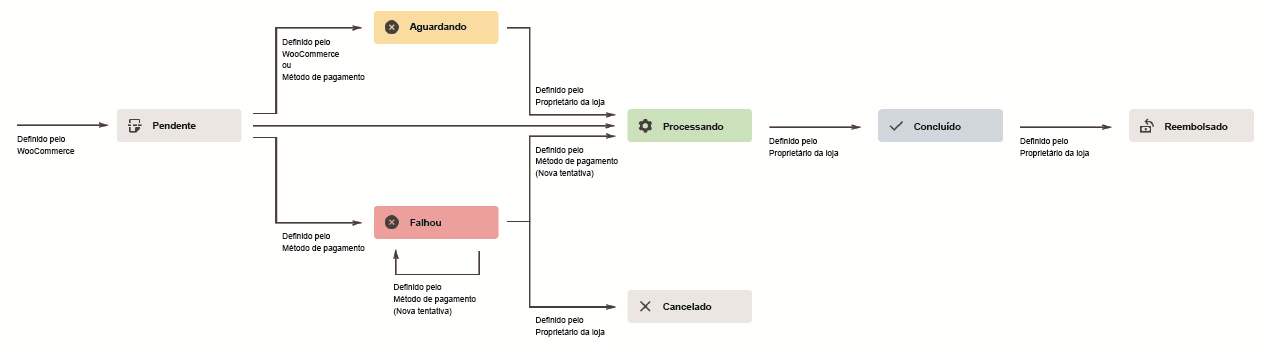
Visual diagram to illustrate order statuses
This visual representation illustrates the processing of an order through its status from “Payment pending” to “Completed”, “Canceled” or “Refunded”.”
Below, we'll take a closer look at each of the Order status in WooCommerce:
1 - Pending payment
The order shows a status of “Pending” while waiting for the payment to be completed.
So if an order remains “Pending” for a long time, it could mean that the payment has been blocked and returned.
Pending orders are nothing to worry about and it doesn't mean that the person will be charged twice. But when the user completes payment for an order, the status will briefly change to “in process” before going to “Completed”.
2 - Payment refused
One of the frequent reasons for refused payments is a lack of money in the account. In fact, if the current account balance is zero and the payment method is debit, it will be refused online.
Another reason for a declined payment is when the credit card details are incorrect.
Another reason for refusing payment is that some electronic merchants do not accept certain types of bank card.
If you have one of these bank cards, your payment will be refused on the site.
3 - Waiting
When this status appears, it means that payment is pending. In other words: the order has been received, but payment is still waiting. An interesting aspect is that when this happens, the product is already reserved in stock for the customer until payment is made.
4 - Processing
Processing takes place when payment has been received (paid) and the order is awaiting confirmation. All products require processing, except those containing only virtual and downloadable products.
If payment has been successful and the order does not contain digital or downloadable products, the order will be set to “Processing”.
5 - Completed
This is when the request has been completed and requires no further action.
6 - Canceled
The order was canceled either by the customer or by the store administrator. When this happens the stock is increased and no further action is required.
7 - Refunded
This Status is when the customer is reimbursed by the administrator. Thus, no further action is required.
How do I change an Order Status in WooCommerce?
The order data panel allows you to manually change the order status, display (or change) the customer's order note and change which user the order is assigned to.
Order statuses are color-coded and described:
- Canceled - gray
- Completed - Blue
- Fault - red
- On hold - orange
- Pending payment - gray
- Processing - Green
- Refunded - Grey
If you are using the Post Office and want to automate the status change according to the delivery, there are suitable solutions for this, such as the plugin WC Post Office Status Updater. With this plugin you can keep your customers informed of every delivery update. Order sent by the Post Office? Automatic e-mail to the customer. Item left for delivery? Automatically notify the customer.
Another interesting plugin to help with order management is WooCommerce Order Status Manager which allows you to create, edit and delete custom order statuses and integrate them seamlessly into your WooCommerce order management flow. You can also edit the main order status and trigger new order emails based on status changes.
Conclusion
O WooCommerce is a plugin designed to manage online stores in a practical and intuitive way.
Its features have been developed to facilitate user navigation. Because they have similar nomenclature, order statuses are often confused, causing a problem for both the e-commerce administrator and the consumer.
One of the mistakes that happens most often is confusing the status “processing” and “waiting”. It never hurts to reiterate: when your order is as processing means that payment has already been made and your product is being shipped. Your order is almost complete.
If you are like waiting means that your order has been received but payment is still on hold. In this case, the product is already reserved for the customer and will be released as soon as payment is confirmed.
Now that you know how Order Status works in WooCommerce, it's time to get your store live!
Want to receive a e-commerce budget now? Get in touch!

Frequently Asked Questions
What are the main order statuses in WooCommerce?
WooCommerce has seven main statuses: Payment Pending, Declined, Waiting, Processing, Completed, Canceled, and Refunded. Each of these statuses indicates a different stage in the processing of the order, from initiation to completion or cancellation.
What does the status "Waiting" mean in WooCommerce?
The status “Waiting” means that the order has been received, but payment has not yet been confirmed. The product is already reserved in stock for the customer, pending confirmation of payment.
How can I automate order status changes in WooCommerce?
You can automate status changes using plugins such as WC Correios Status Updater, which automatically updates the order status according to delivery stages, or WooCommerce Order Status Manager, which lets you create and manage custom statuses.
What is the difference between the statuses "Processing" and "Completed" in WooCommerce?
The “Processing” status indicates that payment has been received and the order is being prepared, while the “Completed” status means that the order has been fully processed and requires no further action.

Caio Nogueira
Caio Nogueira is co-founder of UpSites and a reference in website development and SEO consultancy. With over 10 years' experience and more than 900 projects completed for brands such as KaBuM, UNIMED, USP and Nestlé, Caio stands out for his competence in digital project management.Caio has also been a guest author on influential digital marketing websites such as Neil Patel, Rock Content, Hostinger, Duda, Hostgator and Locaweb, where he has shared his expertise in SEO and content marketing.
See all posts



 Calculate Price Now

