

Why and When to Update the Site and Its Content [2026]
Summary (TL;DR)
In this post, we'll talk about the the importance of keeping your website up to date to ensure relevance and good user experience.
We'll cover the main reasons for updating your site, such as improve Google ranking, optimize design and adapt to new technologies.
We will also discuss signs that your site needs updating, such as outdated content and performance problems, as well as practical tips on how to carry out these improvements efficiently.
By the end, you'll understand how regular updates can strengthen brand credibility and increase organic traffic.

Know when to update the site is one of the most important actions to ensure that it remains relevant and effective. By 2025, the user experience is essential to the success of any online page. A outdated website, A site with old content or an outdated design can impair navigation and, consequently, visitor satisfaction.
In addition, search engines such as Google consider the relevance of content and constant updating to be important factors for ranking in search results. Therefore, keeping your website up to date not only improves the user experience, but is also key to securing good positions on Google.
Updating your website is a way of showing visitors that your brand is active and committed to offering the best information and resources. This ranges from redesigning (such as the redesign website), updating relevant content, adding new features and adapting to new technologies.
Want to know how to make these updates? Come with us!
Why Update the Site and Its Content?
There are many reasons why updating the website and its content should be a priority for any business. It's not just a question of maintaining the aesthetic appearance, but of ensure that website remains functional, relevant and optimized<span style=”font-weight: 400;”> for the new demands of users and search engines.
Website updates have a direct impact on search rankings, user experience and even the company's commercial performance. Check out the main reasons for carrying out these updates.
Improves User Experience
When the website is constantly updated, it becomes easier to use, with more relevant information and optimized navigation. By investing in design and content improvements, you facilitate the user journey, which results in greater engagement and satisfaction.
User experience is a critical factor in retaining visitors, and a outdated website can be frustrating and lead users to abandon the page quickly.
Increases Search Engine Visibility
Updating your website is also fundamental to maintaining visibility on search engines. Google, for example, prioritizes sites that are updated frequently. New and relevant content, as well as a modern design, are factors that help improve ranking in search results.
When your website is constantly optimized and updated, it increases its chances of appearing in the top positions, attracting more organic traffic and, consequently, more potential customers. Ignoring content updates can cause your site to lose positions and become invisible to users.
Keeping up with New Design and Technology Trends
Website redesign is one of the most effective ways of updating the appearance and functionality of a page. Design trends and digital technologies are constantly evolving, and your website needs to keep up with these changes to remain competitive.
An outdated website can look old-fashioned and compromise your brand image. On the other hand, a modern website that incorporates the latest innovations in design and functionality conveys professionalism and reliability, which can attract more visitors and generate more conversions.
Strengthens Brand Credibility
Regularly update content and website design shows that your brand is active and committed to offering the best to its users. When the site is not updated, visitors can see that the company is no longer committed to quality or no longer has a presence on the market.
This can damage the brand's credibility. Keeping content relevant and up-to-date creates an image of professionalism and trust, showing that your brand is always willing to adapt to the needs and interests of your customers.
Optimizes Site Performance and Speed
The update also has a direct impact on page performance and loading speed. Slow websites can be frustrating for users and detract from the browsing experience. In addition, Google considers loading speed to be one of the ranking criteria.
By optimizing your site and keeping your code clean and efficient, you ensure that it loads faster, providing a more pleasant user experience. Improving performance not only helps to retain visitors, but also improves the conversion rates, because users are less likely to abandon the site due to long waiting times.
Signs That Your Website Needs Updating
There are several signs that indicate that it's time to update the site and its content. Paying attention to these signs can help keep your site relevant and optimized, as well as ensuring that the user experience is always positive. Check them out:
- O website design seems outdated;
- Page load times are slow;
- The information on the website is no longer up to date;
- The site's content is not in line with current trends;
- The site is not mobile responsive;
- The pages are not optimized for SEO;
- The site is not generating enough organic traffic;
- The site has no integration with social networks or other tools;
- The content is not being shared or commented on in the digital platforms;
- The site is experiencing frequent technical problems.
Here's an example of an outdated website:
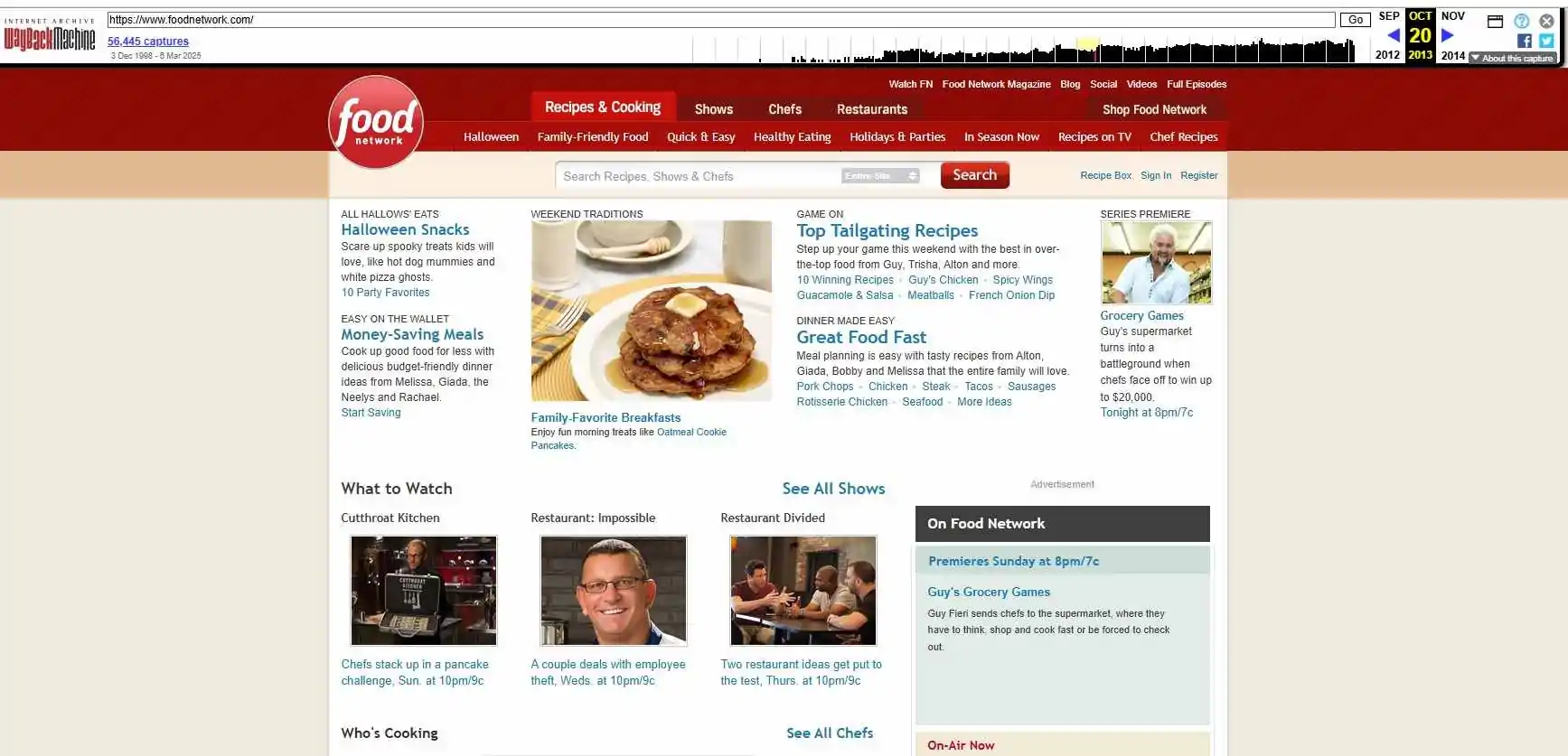
Notice how there is a lot of information scattered around the page. In addition to the unintuitive retro design and lack of accessibility. This site was on the air between the 90s and early 2000s. You can check out more images of it and other old sites in the collection archive.org/web.
In short, updating the site is essential to ensure its competitiveness and market relevance. Ignoring these signals can damage performance and the user experience, as well as negatively affecting your SEO and brand image.
How does the update impact on SEO?
Constantly updating your website is one of the key factors in ensuring good performance on search engines. Updating content for SEO is essential because search engine algorithms, such as Google's, prioritize sites that offer information that is recent, relevant and optimized for the user's needs.
When you keep your site up to date, increases the chances of getting better positions on the results pages, search engines recognize this as an indication that the site is of high quality.
What's more, a website with up-to-date content, a well-organized structure and good SEO practices tends to have a greater user retention rate. This means that visitors stay longer on the pages and interact more with the content, which is a good sign for search algorithms.
Updating content also has an impact on indexing of pages. When reviewing and optimize your content regularly, you make it easier for search engines to index your pages, which can result in a better ranking.
When to Update the Site Content?
There is no rule on when to update the content of the site, but a good practice is to realize periodic audits to identify pages that need refreshing.
Some pages, such as price comparisons or event information, naturally need to be updated more frequently. The content “evergreen” (timeless content) can have a longer interval between updates.
The important thing is to audit your content regularly to identify pages that are no longer performing well or that may be out of date.
Check out step by step to carry out this audit and find the pages that need updating.
1. Audit Your Content
The first step to keeping your website up to date is to carry out a content audit. This involves compiling all the pages on your site and analyzing them critically. Check their relevance, accuracy, engagement (such as views and time on page) and their performance in the SERPs.
Identifying pages that are underperforming or have obsolete information is a good place to start when it comes to updating.
2. Check for Outdated Information
When auditing content, look for information that may have become outdated over time. Statistics that have changed, dates or events that have passed or any reference to products, services or technologies that have been discontinued or changed deserve attention.
Keeping these details up to date is key to ensuring that your content remains relevant and useful to your audience.
3. Analyze Performance Metrics
Tools such as Google Analytics and Google Search Console are essential for analyzing the performance of each page on your site. Using these tools, you can identify pages with low traffic, low conversion rates or low engagement rates.
If a page is showing these signs, it may be time to revise its content and make it more attractive to users and search engines.
4. Do a Classification Review
As well as analyzing performance metrics, it's important to review your site's rankings in search engines. If some pages have fallen in the rankings or are no longer ranking for the right keywords, it's time to invest in upgrades.
SEO is an ongoing process, and regular updates can help keep your site well positioned, increasing its visibility and organic traffic.
5. Monitor Competitor Sites
An effective way of knowing whether your content needs updating is to monitor the performance of your competitors. Analyze whether they are covering topics in a more current, in-depth or relevant way. Using data from Google Search Console, you can identify which pages are receiving the most clicks and compare them with the pages on your own site.
If you notice that you are losing clicks or positions, it may be time to update your content to regain visibility and attract more visitors.
How to Update Your Website Effectively?
Updating your website efficiently requires a series of strategic steps that ensure not only that the appearance and functionality are maintained, but also that it is continuously optimized for SEO and user experience.
Website update strategies are essential to ensure that your site remains relevant, attractive and competitive. Here are some important steps to carry out an effective update:
1. Do a Site Audit
The first step towards an effective update is to carry out a detailed audit of your site. To do this, create a report or spreadsheet with all the pages on your site, identifying those that need improvement, content updates or technical adjustments.
Evaluate the relevance of each page based on factors such as performance in the SERPs, engagement rates and outdated content. For example, if a page has few views, you may need to revise it by updating the content or page structure.
Tip: include columns for last update date and performance metrics, so you can easily track progress over time.
Use tools such as Google Analytics and Google Search Console to obtain data on the pages that need attention. This will help you focus on the most important pages with the greatest potential for improvement.
With an organized report, it's easier to prioritize updates, improve navigation and the performance of your site. Each page should be reviewed based on its value and importance to your business objectives, ensuring that you're investing in what really impacts your business. your site's success.
2. Improve the Visual Elements
The visual elements of your site have a big impact on the user experience and the perception of your brand. Replace old images, reorganize text blocks and make buttons more visible are just some of the actions that can revitalize your site's appearance.
Adding dynamism to the design, for example with microinteractions (subtle movements of elements that respond to clicking or scrolling) can also make navigation more interactive and enjoyable.
A reorganization of the homepage or key pages, focusing on the user experience, is also fundamental. Design improvements are made with changes to photos, graphics and videos, making the site more modern and visually appealing.
Take this example from UpSites' own homepage. See how intuitive and well presented the menus are:
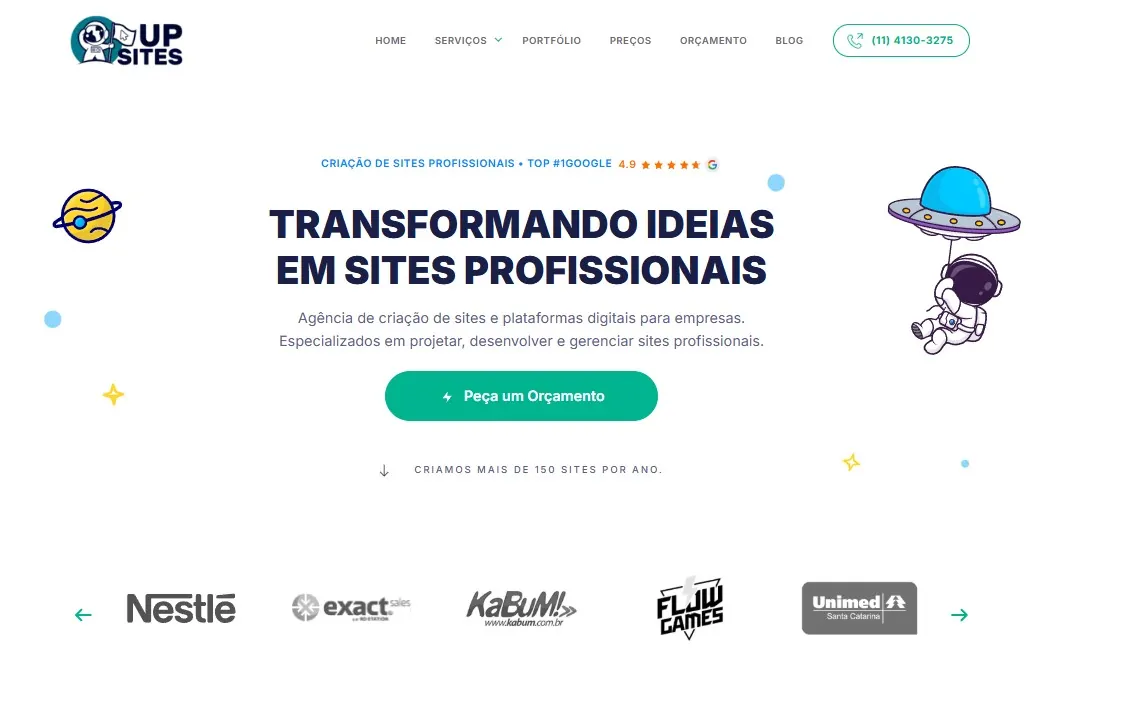
Visual improvement should not be limited to aesthetics. It is important that usability is always taken into account. The structure of navigation must be intuitive, The visual elements must guide the user clearly and efficiently, facilitating interaction with the content and conversion.
3. Defining a Content Strategy
In addition to updating the content, it is essential to define a content strategy to ensure that your site remains relevant in the long term. Organize not only the necessary updates, but also all the regular maintenance that needs to be done to keep the site up to date.
Having an editorial calendar is very important for planning new content and revisiting old ones, keeping a constant flow of fresh information for users and search engines.
To do this effectively, follow this step-by-step guide:
- Brainstorm: generate content ideas for update and improvement topics;
- Plan: create a roadmap for updates, scheduling them all in your content calendar;
- Production: carry out updates continuously, revising and improving the content;
- Publication: launch the revised content according to plan;
- Maintenance: after a while, revisit the content for new updates;
- Repeat: carry out this process continuously, keeping the contents fresh.
This strategy not only ensures that your site is always optimized, but also contributes to ongoing SEO, as Google prioritizes sites with fresh, up-to-date content.
4. Update the Theme, Plugins and CMS
In addition to updating the content, the website maintenance and SEO also involves updating the theme, plugins and CMS (Content Management System). These components are essential to ensure that your website works efficiently and securely.
Regular updates help to prevent security breaches, improve site performance and maintain their compatibility with new technologies and resources.
Failure to update plugins or the CMS can result in security vulnerabilities that put important data from your site and users at risk. In addition, the latest versions of plugins and themes usually include performance improvements, new features and adjustments to keep up with browser and operating system updates.
5. Bring New Things to the Content
To keep your site relevant, it's important to bring new features to your content, such as updating existing content, adding internal links, change the layout of a page, or even a complete redesign of the site. Updating content can range from minor text edits to significant changes in its structure or appearance.
These are just a few ways of bringing news:
- Add new topics or expand existing articles;
- Change images or add new videos to make pages more dynamic;
- Reorganize the navigation or change the layout to improve the user experience;
- Redesigning the site based on feedback and current trends to ensure that it is always attractive.
The important thing is to ensure that the updates meet the user's search intent, offering the content they are really looking for, in an optimized and pleasant way.
Final Thoughts - When to Update Your Site
Keeping your website up to date is an ongoing process and fundamental to ensuring that it remains competitive, relevant and optimized. Through an audit and planning, you can improve the user experience and keep your site optimized for SEO.
If you need help with Web development or want to optimize your existing site, the UpSites offers customized solutions to guarantee performance and user experience with SEO optimization. Contact us and find out how we can help your business grow online!
Frequently Asked Questions
How often should I update my site?
The recommendation is to update the site at least once a quarter, realizing regular audits to identify outdated pages, technical errors or opportunities for improvement. Keeping content fresh and relevant is essential to guaranteeing a good SEO performance and a positive user experience.
What are the signs that my site needs an update?
Some common signs that your site needs updating include: outdated design, outdated content, slow loading time, low conversion rate e drop in organic traffic. In addition, pages that are not responsive or have security problems indicate the urgent need for adjustments.
How do website updates affect SEO?
Updating the site regularly improves search engine ranking, because the Google prioritizes sites with fresh and relevant content. In addition, adjustments to keywords, meta tags and technical optimizations help increase organic traffic, visitor retention and site authority.
What's more important: updating the content or the design of the site?
Both are important, but the priority should be update content with relevant information and SEO optimizations. Then adjust the design to improve navigation, loading speed and user experience ensures that visitors stay longer on the site and make more conversions.

Lucas Pelisari
Lucas Pelisari has been an SEO and content specialist at UpSites for over 6 years, working on the creation and optimization of digital strategies focused on lead generation and organic growth.With experience in website development projects, on-page SEO and link building, he works directly on structuring content and pages aimed at positioning on Google and acquiring qualified traffic.Throughout his career, he has worked on projects for companies such as Kommo, Aldanth, Physical Care, In4, Design.com, Adaptive, Clipto and YeSim, as well as several other clients served by UpSites.He works on projects in different niches, including technology, SaaS, services and local businesses, with a focus on performance, conversion and scalability.Her work is directly linked to lead growth and increased organic visibility, with projects that have seen consistent traffic gains after implementing SEO and content strategies.His content covers topics such as professional website creation, SEO, page structure, performance, user experience and digital growth strategies, always with a practical approach based on real market scenarios.Professional networks:LinkedIn: https://www.linkedin.com/in/lucas-widmar-pelisari-78920033/Instagram: https://instagram.com/lucaswidmar
See all posts


 Calculate Price Now

