

Navigability and Site Navigation: The Good Practice Guide 2026
Summary (TL;DR)
This guide addresses the importance of site navigation and navigability to improve the user experience and increase conversions.
It defines what navigation and navigability are, as well as how they are connected to the site's usability.
The article details different types of navigation, such as horizontal bars, dropdown menus and footer menus, and offers 10 best practices, including keeping navigation simple, optimizing for mobile devices and providing visual context.
I bet this has already happened to you...
You're in a large supermarket and:
- You can't find any signs to help you find your way around, so you end up walking through all the corridors before you find what you're looking for.
- The products are disorganized.
- The team doesn't know which products are available.
Real chaos.
Eventually, you decide not to leave without buying anything because you already have some products in your trolley and you don't want to just leave them anywhere.
But he certainly won't be eager to return.
Now imagine if that store were your e-commerce.
Nobody would spend even ten minutes browsing all the categories before finding what they need. It's easy to abandon a cart, just close the browser tab.
This can happen if you don't help your customers find their way around your site.
In other words, this is what happens if you don't consider the navigability.
In this guide, we'll explain the concept of website navigation and navigability and how it affects the usability e user experience. We will cover the different types of site navigation, good practices and examples to improve the navigability and usability of your site.
What is Site Navigation?

Example of site navigation by UpSites.
Site navigation describes the way users find areas of a website and perform desired actions through the structure and organization of the site.
It involves the use of menus, buttons, links and other design elements that help users navigate through the different pages and sections of the site, ensuring good navigability on a website.
What is navigability?
Navigability refers to the ease and efficiency with which users can use the site's navigation to achieve their goals.

It is a measure of the user experience, taking into account how intuitive and accessible the site design is. Good navigability means that users can find what they are looking for quickly and effortlessly. Good navigability provides users with a fluid and pleasant experience.
To achieve this, users must always know:
- Where they are on the site.
- How to return to the previous page quickly.
- How to continue browsing until you find the product you want.
Site Navigability and Usability: How They Are Connected
Navigability and usability are fundamental to the success of any website. The end result of poor navigability is lost sales.
In fact, this is one of the main reasons why users leave your site without buying anything.
Navigability is closely linked to user experience and usability.
Poor navigability results in poor usability, which creates a negative user experience.
This implies:
- Short dwell time: users quickly leave the site because they don't feel comfortable browsing, increasing the bounce rate and harming SEO.
- Abandoned carts: it's easy for a frustrated user to abandon a cart just by closing the browser tab.
In short, an e-commerce site with poor navigability will have a worse Google positioning and a very low conversion rate, as most organic visitors will leave without making a purchase.
Types of Site Navigation Structure
Before we talk about best practices, let's review the different types of site navigation.
Although you are not limited to these options, they are the general types you see in the web. Generally, it's best to stick to these formats so that users know what to expect, improving the navigability of the site.
Horizontal Navigation Bar

Image of the website we made for our client Asksuite.
The header navigation bar is the most common type. These top-level links are displayed horizontally, side by side, in the header.
They usually include the site's most important pages, those that users need to access quickly.
Dropdown Navigation Menu

Image of the website we made for our client Flow Games.
Dropdown menus are navigation layers that keep your content and products organized. The most important links are used as top-level navigation.
When a user clicks or hovers over a link, a menu expands with more links. There can be several layers of dropdown menus.
These menus are ideal for sites focused on web navigability that need to offer many paths for users to find what they need.
Intelligent organization prevents your site from becoming cluttered and gives users the feeling of moving forward, improving the user experience.
Hamburger Navigation Menu

Example of a Hamburger menu we made for our client Veris.
You see this menu a lot on websites and mobile applications.
Instead of listing the top-level links on the page, everything is hidden behind a button.
Tapping on the icon reveals the menu. Tapping on a menu item expands the menu further, revealing additional options.
Vertical Navigation Menu in the Sidebar
A vertical sidebar menu is a list of links stacked on top of each other, positioned on one side of the page.
This format is best for sites that have a lot of top-level navigation options for a horizontal menu. The downside is that they take up a lot of space on the page.
Sidebar navigation is also useful on internal pages where users need more specific options and internal links to facilitate their shopping experience.
Navigation menu in the footer
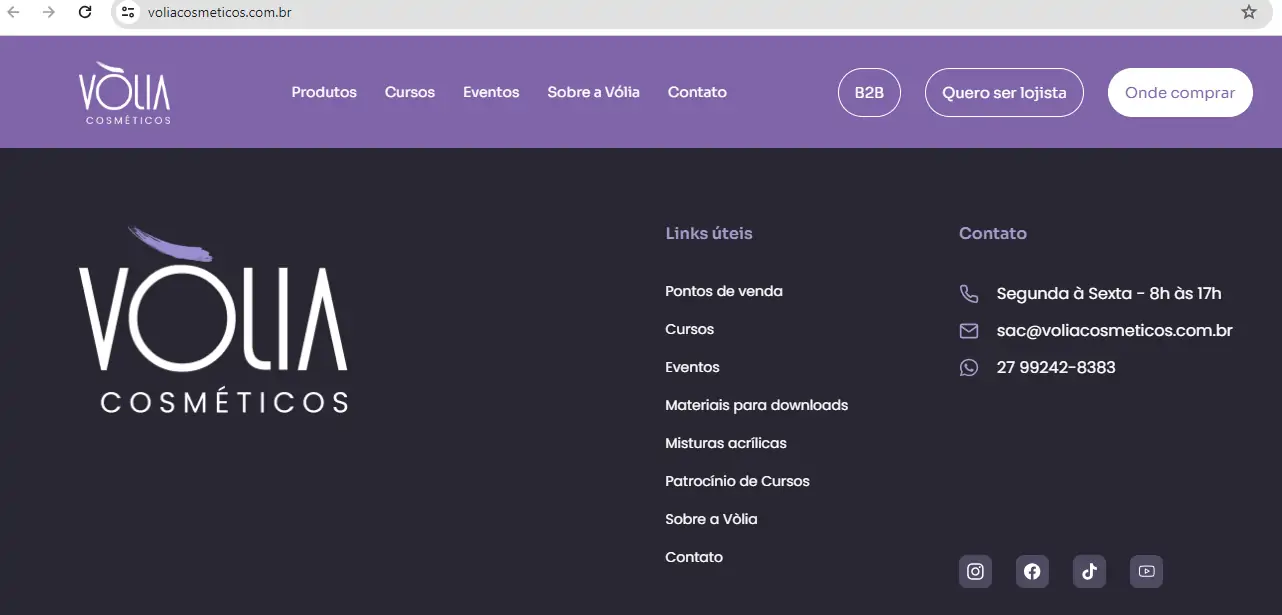
Image of the website we made for our client Volia.
The navigation menu in the footer is a “collection point”.
It usually contains links to most of the site's pages (although posts by blog and individual product pages are generally not included).
Although you shouldn't fill your footer menu with links to everything, it's smart to offer plenty of options, not only to improve navigability but also to internal linkage pages, with SEO in mind.
Good navigability practices
- Keep Navigation Simple: Make it easy to find the most important information.
- Prioritize Visibility: Use legible fonts, contrasting colors and consistent menus.
- Use Clear and Descriptive Labels: Help users immediately understand what to expect when they click on a menu item.
- Limit the use of buttons to CTAs: Reserve buttons for important actions, keeping navigation simple.
- Optimize Navigation for Mobile Users: Make sure links are large enough and menus are easy to use on mobile devices.
10 Good Navigability Practices and Examples
There is no single way to design your site's navigation. Navigation must be designed to appeal to your specific customers, which requires research, design experiments and testing.
Always center the design on the user. What you or your team want is not the most important thing. Don't expect the navigation of your site to be the same as that of other retailers or competitors.
- Reduce Your Top-Level Navigation Links to Seven
Choose the most important pages for the main navigation, avoiding excess. Reducing the number of navigation links at the top level helps keep the interface clean and easy to use.
- Choose the Order of Menu Items Strategically
Place the most important links at the beginning and end of the menu. People tend to remember the first and last items on a list better, so take advantage of the serial position effect to highlight the crucial items.
- Optimize the Navigation of Your Mobile Site
Have a responsive menu and separate links focused on shopping from other types of content. Mobile navigation should be as efficient as desktop navigation, ensuring a good experience for all users.
- Replace Dropdown Menus with Detailed Pages
When dropdown menu options are too many or complex, consider replacing them with a detailed page. Dropdown menus can be annoying and limit the amount of information you can provide, affecting navigability and usability.
Make sure the search bar is visible. Users who use site search generally convert twice as much, so ensuring that search is easy to access is crucial.
- Provide Context for Your Users
Include icons or other visual clues in your menu to help visitors find the right page. Visual context can significantly improve site navigation.
- Create Separate Navigation Menus for Different Audiences
Divide your links into two menus to cater for different groups of users. This prevents users from finding irrelevant content, making navigation more efficient.
- Create a comprehensive footer
Footers with lots of links are a great solution, as they provide quick access to all the important pages on the site. A comprehensive footer can serve as a second main navigation.
- List Child Categories in Other Higher Level Categories
If a page falls into two categories, list it in both. This helps users find what they're looking for without getting lost, improving the navigability of the site.
- Remove Social Media Icons from the Header
Post links to social networks in the footer. They are less likely to divert visitors' attention, keeping them on your site and focused on the main content.
Conclusion
A well-structured site navigation is important for the navigability and success of your site.
Invest time in research and testing to ensure that your users can easily find what they need, improving their experience and increasing your conversions.

Frequently Asked Questions
What is navigability?
Navigability refers to the ease with which users can find information on a website. This involves having a clear structure, well-organized menus and the ability to move between pages with a few clicks.
Why is usability important?
Usability is important because it determines how easy and intuitive it is for visitors to use the site. A website with good usability improves the user experience, increasing their satisfaction, the time they spend on the site and conversion rates.
How can I improve the navigability of my site?
To improve the navigability of your site, organize it logically, with clear categories and subcategories. Use menus that remain visible as the user scrolls down the page and keep the main menu to a limited number of items to avoid overwhelming visitors.
What are the best practices for navigating a website?
Best practices for navigating a website include following common conventions, such as hyperlinks in blue and logos in the top corner. It's also important to add a search bar in an easily accessible place and to use clear, objective descriptions for menu items.
What is a navigation menu?
A navigation menu is an essential element in websites and web applications that allows users to access different sections or pages of the site in an organized and intuitive way. It usually consists of a list of links, arranged horizontally at the top or vertically on the side of the page, helping visitors to quickly find the information they need.
What does navigability mean in a web application project?
Navigability in a web application project refers to the ease with which users can move around and find information within the application. This includes a clear structure, organized menus and an intuitive user experience that makes it easy to locate important content with minimal effort.
What is website usability?
Website usability refers to the ease of use and efficiency with which users can perform their tasks on a site. A website with good usability is intuitive, responds quickly, and presents information in a clear and accessible way, ensuring that visitors have a positive and frustration-free experience.
How important is navigability?
The importance of navigability lies in ensuring that users find what they are looking for quickly and efficiently. Good navigability improves the user experience, reduces the abandonment rate and increases visitor satisfaction, which can lead to greater engagement, better retention and higher conversion rates for the site.

Caio Nogueira
Caio Nogueira is co-founder of UpSites and a reference in website development and SEO consultancy. With over 10 years' experience and more than 900 projects completed for brands such as KaBuM, UNIMED, USP and Nestlé, Caio stands out for his competence in digital project management.Caio has also been a guest author on influential digital marketing websites such as Neil Patel, Rock Content, Hostinger, Duda, Hostgator and Locaweb, where he has shared his expertise in SEO and content marketing.
See all posts



 Calculate Price Now

