

How much does software cost for my company?
Summary (TL;DR)
In this post, you will understand how much does small business software cost and how different factors influence this investment, such as the type of license (SaaS or perpetual), level of customization, number of users, and technical support.
We also show the main categories of available software - such as ERP, CRM, financial management, productivity and collaboration - explaining how each can help increase efficiency, reduce errors and improve your business results.
We discuss the difference between ready-made and customized software, We've also highlighted the advantages and disadvantages of each model, so that you can choose the solution that best suits your type of company and budget.
If you want to transform the way your company operates, automate processes and accompany growth with technology, this guide brings you everything you need to make the best decision.

Investing in technology is no longer a differentiator but a necessity for those who want to improve productivity and optimize processes. When we talk about How much does software for a small business cost?, The price can vary depending on the features offered and the level of customization.
O preço de um software personalizado parte geralmente de R$15.000,00 e pode chegar a valores bem altos, acima de R$100.000,00. Tudo depende das características que o cliente necessita.
However, more than the price, what really matters is the impact that an efficient system can have on business management and growth.
A recent study of small business leaders revealed that 43% of respondents are looking for new technologies to increase productivity and collaboration. This shows that, even in smaller organizations, the adoption of intelligent software can transform day-to-day operations, reducing manual tasks and making processes more agile and precise.
If you are considering investing in a System to optimize your business, it's important to understand the factors that influence cost and how to choose the best solution for your needs. Let's explore the main options available, compare prices, and show how software can be a strategic ally for your business. Check it out!
Types of Software for Small Businesses
Small businesses can benefit from different types of software to improve their performance. management, automation and productivity. From integrated ERP solutions From CRM and financial systems to collaboration tools, the choice of the ideal software depends on the business's needs.
Check out the following for the main types of software and how they can boost your company's efficiency:
ERP (Enterprise Resource Planning)
ERP is a system that centralize and integrate various administrative and operational processes of a company, facilitating decision-making and the management of different business areas.
Can be used for:
- Inventory Control and Logistics
- Managing the acquisition of inputs and suppliers
- Project planning and monitoring
- Risk management and compliance
- Accounting and financial control
The main advantage of ERPs It is the unification of information in a single system, avoiding communication failures between departments and ensuring greater data accuracy. Furthermore, process automation reduces the time spent on repetitive tasks, increasing team productivity.
CRM (Customer Relationship Management)
CRM is a system aimed at customer relationship management, helping small companies to organize contacts, follow up on negotiations and optimize service.
Can be used for:
- Customer registration and history
- Managing leads and sales opportunities
- Automation of follow-ups and interactions
- Analysis of customer service and loyalty metrics
Investing in a CRM software for small businesses improves customer retention and boosts sales, as it allows for closer and more personalized follow-up of each negotiation. In addition, automating contact processes reduces the loss of commercial opportunities.
Financial Management
Financial management software helps controlling cash flow, organize accounts payable and receivable and generate financial reports that help the financial health of the business.
Can be used for:
- Cash flow control
- Issuing bills of exchange and invoices
- Managing payments and receipts
- Generation of financial and tax reports
The great advantage of a financial system is to ensure greater control and organization of finances, avoiding manual errors and helping to forecast expenses. With this, small businesses can reduce waste and improve their profitability.
Productivity Tools
Productivity tools are systems that help with task management, This helps small businesses to be more efficient on a daily basis.
Can be used for:
- Task and project management
- Sharing files and documents
- Monitoring team productivity
- Workflow automation
Using these tools improves organization and time optimization, allowing the team to work with more focus and efficiency. In addition, automating processes reduces errors and increases the agility with which tasks are carried out.
Collaboration Systems
Collaboration systems are essential for teams that need to work together, even remotely. They facilitate communication, the sharing of information, the organization of meetings and the project management.
Can be used for:
- Instant communication between teams
- Video conferences and online meetings
- Sharing and editing documents in real time
- Integration of remote teams
By adopting collaboration systems, small companies gain in agility and efficiency, reducing the need for face-to-face meetings and improving the exchange of information between teams. This contributes to greater alignment and productivity in the workplace.
Factors that Influence Cost
O price of software for small businesses can vary greatly, depending on different factors and billing methods. Some solutions are purchased through monthly or annual subscriptions (SaaS), while others work on a one-off basis (perpetual license).
In addition, aspects such as customization, technical support and the number of users also influence the final cost. We'll explain each of these factors to help you make the best decision for your business:
License (Perpetual vs. SaaS)
The software license defines how it will be acquired and used. There are two main models:
Perpetual license → The software is purchased once and can be used indefinitely, without recurring payments. However, support and updates may be charged separately.
SaaS (Software as a Service) → The software is made available through a monthly or annual subscription, usually hosted in the cloud. This model includes support, constant updates and scalability, making it more flexible for growing companies.
see the model of a cloud management system integrated into the website of one of our clients:
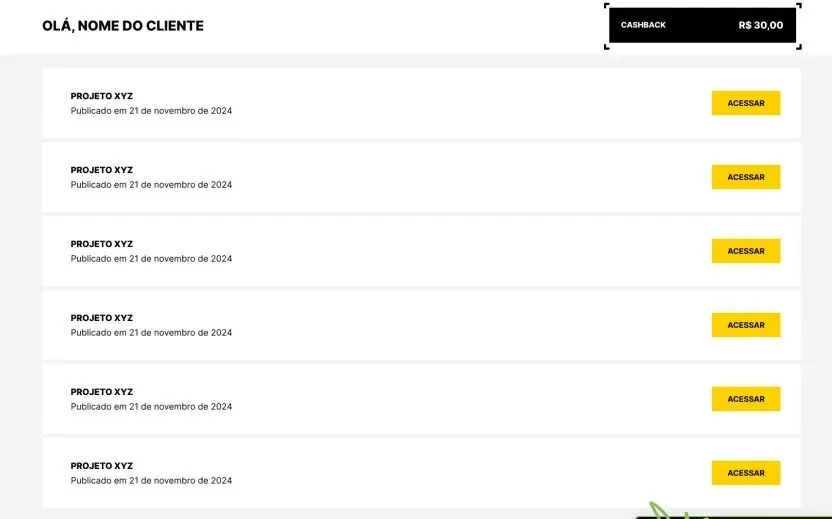
In this example, we can see that it is possible to manage several tasks separated by sector. This makes it easier when the company requires many areas of work.
Returning to the subject of licenses, while the perpetual license may seem more economical in the long term, the SaaS model offers more flexibility, fewer maintenance worries and predictable costs, which can be advantageous for small businesses that want to optimize their spending.
Customization
The level of customization and integration of software also directly affects its price. Ready-made, standardized systems usually cost less, but may not meet all the specific needs of the business. A software house which makes bespoke systems, can be more expensive.
If the company needs exclusive functionalities, integrations with other platforms, or a layout adapted to its workflow, the software may need to be custom-tailored, which increases development costs. However, this customization can be an essential investment to ensure operational efficiency and process optimization.
Technical Support and Updates
Another factor that influences cost is the level of technical support offered. Software that includes 24/7 support, priority service and frequent updates tends to cost more, but these features are fundamental to keeping the system up to date and secure.
If the software doesn't have good technical support, unexpected problems can affect the operation of the company, causing losses. That's why, before choosing software, it's essential to assess the quality of the support offered, the frequency of updates and the additional cost of maintenance.
Number of Users
The number of users who will use the system can also have an impact on the final price of the software. Many platforms charge based on the number of simultaneous accesses or the total number of employees registered.
If your company has a small team, a basic plan may be enough. However, for companies that need multiple accesses and different permission levels, it is necessary to invest in more robust plans.
The ideal is to choose software that allows scalability, so that the company can increase the number of users as it grows, without having to change systems in the future.
Ready-made software vs. customized software
When in doubt about how to choose small business software, it's important to understand the differences between ready-made software and customized software. Both have the same objective: to automate processes, improve management, and increase business efficiency. However, each option has its own characteristics, with advantages and disadvantages that should be analyzed according to the company's needs.
Ready-made software
Ready-made software is a solution already developed and available for immediate use. It is usually marketed in the SaaS (Software as a Service) model, with monthly or annual subscription plans. This type of system serves several companies in a standardized way, without the need for bespoke development.
Advantages:
- Lower initial cost
- Quick and easy implementation
- Updates and support already included in the plan
- Ideal for companies with simpler processes
Disadvantages:
- Little flexibility for adaptations
- May not meet all the company's needs
- Features and functionality may be limited for specific businesses
Customized Software
Customized software is tailor-made to meet specific demands of a company. It can be created from scratch or adapted from an existing system, allowing total flexibility in the choice of functionalities and integrations.
Advantages:
- Solution fully adapted to business needs
- Greater control over functionalities and integrations
- It can evolve as the company grows
- Better compatibility with other systems already in use
Disadvantages:
- Higher initial cost
- Longer development time
- Need for specialized technical support
When to opt for each?
Choose off-the-shelf software if:
- You need a quick and affordable solution;
- Your company has standardized processes and doesn't need a lot of customization.
- Your initial budget is more limited.
Choose customized software if:
- Your company has specific demands that ready-made software can't meet;
- You want a scalable system that grows with your business;
- Customized integrations with other systems are essential.
Hidden Costs and Subscriptions
When evaluating the investment in software for your company, it is important to consider not only the initial cost or the monthly subscription fee, but also the hidden costs that may arise during use.
Many solutions offer affordable plans, but charge extra fees for advanced technical support, integrations with other systems, additional storage, or feature upgrades.
What's more, in the case of subscription-based software (SaaS), the company may need extra modules as it grows, which can increase costs in the long term. That's why, before hiring software, it's essential to analyze all the conditions of the contract, possible additional charges and what the financial impact will be in the future.
How to Choose the Best Software for Your Company
The choice of ideal software should take into account your business needs, available budget, and return on investment. To help with this decision, check out some Practical tips for choosing the best solution:
- Define your company's needs List the processes that need to be automated and which functionalities are indispensable.
- Analyze the available budget Choose software that fits your budget without compromising on quality.
- Compare different solutions → Research available options on the market and analyze user reviews.
- Consider the cost-benefit The cheapest software isn't always the best option. Check which features truly add value to your business.
- Check the billing model Understand if the software has a monthly subscription, a one-time payment, or hidden additional costs.
- Evaluate ease of use An intuitive system reduces the learning curve and improves team productivity.
- Check the software scalability → Choose a solution that can grow with your company.
- Check the quality of technical support Efficient support can prevent daily operational problems.
- Test before hiring → Many pieces of software offer free versions or trial periods to evaluate features.
- Consider custom software If the available options don't fully meet your company's needs, custom software might be the best choice.
Conclusion - How much does software cost?
Investing in software for small businesses is a strategic decision which can increase productivity, improve management, and optimize processes. The cost can vary depending on the model chosen, the features offered, and the specific needs of the business.
If you're looking for efficient, scalable software tailored to your company, UpSites Can you help! We developed custom solutions, This will ensure that your software meets the exact demands of your business. Get in touch and find out how we can transform your management with technology! Click on the button below for a quote:
Frequently Asked Questions
How much does small business software cost
The price can vary a lot. Ready-made software as a service (SaaS) can cost starting from R$$100 per month, while custom software usually starts at R$$15,000 and can exceed R$$100,000, depending on the functionalities and the level of customization.
What is the difference between off-the-shelf software and custom software?
Off-the-shelf software is already developed, has quick implementation and lower cost, but little flexibility. Custom software, on the other hand, is tailor-made for your company's needs, with more control and integration — ideal for businesses with specific processes.
What types of software are most suitable for small businesses?
The most common are: ERP (integrated management), CRM (customer relationship management), financial software, productivity tools, and collaboration systems. The choice depends on your business priorities.
What influences the final cost of business software?
The main factors are: license model (SaaS or perpetual), level of customization, number of users, technical support and necessary integrations. Hidden costs such as upgrades, extra modules and storage should also be considered.

Lucas Pelisari
Lucas Pelisari has been an SEO and content specialist at UpSites for over 6 years, working on the creation and optimization of digital strategies focused on lead generation and organic growth.With experience in website development projects, on-page SEO and link building, he works directly on structuring content and pages aimed at positioning on Google and acquiring qualified traffic.Throughout his career, he has worked on projects for companies such as Kommo, Aldanth, Physical Care, In4, Design.com, Adaptive, Clipto and YeSim, as well as several other clients served by UpSites.He works on projects in different niches, including technology, SaaS, services and local businesses, with a focus on performance, conversion and scalability.Her work is directly linked to lead growth and increased organic visibility, with projects that have seen consistent traffic gains after implementing SEO and content strategies.His content covers topics such as professional website creation, SEO, page structure, performance, user experience and digital growth strategies, always with a practical approach based on real market scenarios.Professional networks:LinkedIn: https://www.linkedin.com/in/lucas-widmar-pelisari-78920033/Instagram: https://instagram.com/lucaswidmar
See all posts


 Calculate Price Now

