

35 tips on how to create SEO-optimized content
Summary (TL;DR)
In this post, we talk about a complete checklist for optimizing your blog posts, covering everything from title creation to SEO and UX optimization.
We offer valuable tips to ensure that your content is effective for both readers and search engines, helping you to achieve your marketing goals.

Quick access
Before you publish your next blog post, use this checklist to make sure you fully optimize your content for your readers, search engines and your marketing goals in general. If you want to know how to create optimized content, pay close attention to all the tips!
We'll cover tips ranging from basic optimization to more advanced subjects such as choosing and using keywords. Are you ready? Then let's go!
Tips for writing blog posts
1. Create an initial title
Write down at least one initial idea for the title of the post. Knowing the title before you start writing helps you focus on the subject and deliver what you promise in the title.
2. Identify your audience
Identify exactly who you are writing the blog post for. When you know the exact audience for your content, it's much easier to be direct when writing. If you don't know your audience, use a buyer persona template to start outlining your ideal reader.
3. Know your purpose
All digital content should be created with your marketing plan in mind. Therefore, one of the first things to do is identify the main objective for your blog's marketing content (e.g. building brand awareness, capturing email subscribers, boosting SEO, etc.).
4. Assign a keyword

Use tools that point out the difficulty of keywords to identify the best one to use in the post. The keyword must accurately represent the topic to be written about. It should be relatively popular, have a good search volume and also be competitive with your target audience. website and competitors.
5. Use the keyword in the title
When writing the title of your post, insert the keyword in it. This way you'll show greater objectivity and harmony between the content and the agenda.
6. Assign some secondary keywords
This step is aimed at finding primary-related keywords to use in your post. Choose three or four keywords and thus show the search engines that your content can be more comprehensive for different ways of searching for the same subject.
7. Write more than 800 words
Write as much as you need to fully cover the topic and, as a best practice, write more than 800 words to show search engines that this is a complete post.
8. Add value
When writing your post, provide details, facts, statistics, conclusions, news and valuable and useful information for the reader.
9. Show, don't tell
An important part of this checklist for writing blog content is to use examples that help the audience to deeply understand and absorb the message you are trying to share.
10. Use the active voice
Keep the post interesting by using an active voice. Avoid the passive voice, which can make the content seem monotonous.
The active voice is when the subject performs the action of the verb while the passive voice is when the subject suffers the action, for example “always write your text in the active voice” is an example of what you should do.
11. Write in a way that is easy to understand

Although the quality of the writing should be high, keep it simple. Don't use an overly complex sentence structure or terms that are unfamiliar to most readers. Remember that most of the people who will read your text don't have a technical background or knowledge.
12. Don't steal content
The content you create should always be original and never copied from someone else. website. Plagiarizing content from other sites can lead to search penalties.
13. Provide adequate sources
If you use quotes or information from other sites in your blog post, provide proper citations by listing and linking to the source.
14. Use subheadings
Divide your content by using subheadings throughout your post to separate sections of text. These subheadings are also called H's. H1 is the title, H2 is the subtitle and H3 is the subtitle of the subtitle. There are also those who use H4, but it's not very common.
15. Use the main keyword in at least one subtitle
You should include the keyword in at least one subtitle. It should be inserted naturally.
16. Divide large paragraphs.
Digital content should be readable, so break up large blocks of text and paragraphs by adding paragraphs and white space. Example: I've always tried to write paragraphs with a maximum of three to four lines.
17. Highlight important information.
One of the most important tips for writing content is to use formatting features that make posts easier to read. Use bold, italics or highlight important information with an underline.
18. Add supporting graphics
Your content should also include the addition of images, videos, embedded social posts, etc. that make the post more engaging and interesting.
19. Make sure the images are the right size
Very large images will slow down the loading speed of the site, always try to reduce yours to 300kb or less.
20. Add the primary keyword to the image's alt tag
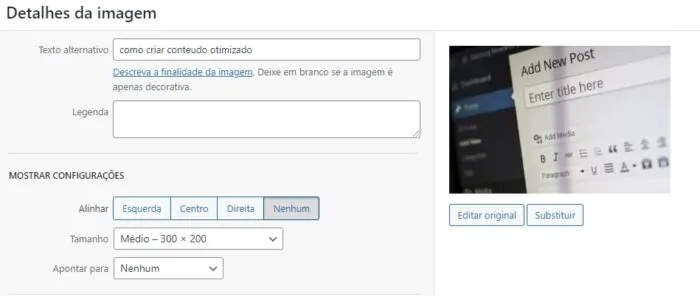
Use the post's target keyword in the image's alt tag to improving SEO from the blog.
21. Use the primary keyword in the name and title of the image file
When adding images, also use the primary keyword in the image's file name and tittle attribute.
22. Avoid copyright infringement of images
Check to make sure you have the right to publish the media to avoid copyright infringement with digital photos and videos. A good solution is to use a copyright-free image depository, for example: Pixabay.
23. Use the main keyword in the meta description
Also, include the main keyword in an original meta description that is no longer than 320 characters.
24. Use the main keyword in the first paragraph
Another optimization tip OnPage SEO is to include the main keyword in the first paragraph of the text, as search engines tend to give it more value.
25. Use the keyword naturally in the text
Don't get involved in too many keywords. Use just enough to create a reasonable density in your text.
26. Use each secondary keyword at least once in the text.
Support the primary keyword by adding each related keyword at least once in the post.
27. Add links to relevant internal pages
Always try to add links to other posts and pages published on your site, adding relevant hyperlinks on the subject you are writing about.
28. Add links to other high-quality web pages
Add relevant outbound links to other high-quality sites to give credit and create links from reliable sources.
29. Set external links to open a new page
Review the external links on your page and set them to open in a new window to keep readers on your site, even if they click on a link to another site.
30. End with a catchphrase
As all good blog posts are written with a goal in mind, end with a call to action that tells the reader what you want them to do next, such as accessing other related and relevant content.
31. Write alternative agendas
Go back to the title and write a few more variations to create a more powerful title. Choose the best title from your new options. Make sure it includes the main keyword and is concise and attractive. The final title should be less than 60 characters to be fully displayed in the search.
32. Optimize social sharing

Encourage readers to spread the word about your posts by creating shareable content that includes links with buttons for users to share directly on social networks such as Twitter, Instagram, and the like.
33. Check the on-page SEO.
Once the post is published, make sure you don't miss any SEO optimization steps by running it through tools such as Semrush or Ahrefs. Another very important tool is the Yoast, which helps to show possible errors and flaws in your text.
Conclusion
Whenever you think about writing content for your blog or web page, it's a good idea to pay attention to all the tips here, as they can really help your content to be seen by your target audience in search engines.
As well as information quality, UX (user experience) is extremely important and makes all the difference when it comes to internet users reading your content. We can therefore say that this is one of the main factors in the positioning and relevance of a page/blog post in the “eyes” of Google's algorithm.
We hope you've enjoyed these tips, and if so, stay tuned for more posts on our blog.
Frequently Asked Questions
Why is it important to create an initial title before writing the post?
Creating an initial title helps to focus on the subject and ensure that the content delivers what it promises, making it easier to organize ideas.
How to identify the target audience for a blog post?
To identify the target audience, use a buyer persona model, which helps to outline the reader's ideal profile and direct the writing more effectively.
How important is it to use keywords in your content?
Keywords are essential for SEO optimization, as they help search engines understand the topic of the post and improve the visibility of the content in search results.
What should I do to ensure that my content is original?
To ensure the originality of your content, create unique texts and never copy from other sites. Also, provide appropriate citations and links when using third-party information.

Lucas Pelisari
Lucas Pelisari has been an SEO and content specialist at UpSites for over 6 years, working on the creation and optimization of digital strategies focused on lead generation and organic growth.With experience in website development projects, on-page SEO and link building, he works directly on structuring content and pages aimed at positioning on Google and acquiring qualified traffic.Throughout his career, he has worked on projects for companies such as Kommo, Aldanth, Physical Care, In4, Design.com, Adaptive, Clipto and YeSim, as well as several other clients served by UpSites.He works on projects in different niches, including technology, SaaS, services and local businesses, with a focus on performance, conversion and scalability.Her work is directly linked to lead growth and increased organic visibility, with projects that have seen consistent traffic gains after implementing SEO and content strategies.His content covers topics such as professional website creation, SEO, page structure, performance, user experience and digital growth strategies, always with a practical approach based on real market scenarios.Professional networks:LinkedIn: https://www.linkedin.com/in/lucas-widmar-pelisari-78920033/Instagram: https://instagram.com/lucaswidmar
See all posts


 Calculate Price Now

