

(redirect)Responsive Website Creation: The Definitive Guide 2026
Summary (TL;DR)
If you're a business owner or entrepreneur looking for an effective online presence, creating a responsive website is essential. In this definitive guide from 2026, we'll explore everything you need to know about creating a responsive website.
We'll start by explaining what exactly a responsive website is and why it's so important for the success of your online business today. Next, we'll cover the benefits of having a responsive website, including better user experience, optimization for mobile devices and better ranking in search results.
Whether you're creating a website from scratch or updating an existing one, this guide will equip you with the knowledge you need to create a high-quality responsive website that drives the success of your online business.

Quick access
- What does a responsive website mean?
- What website dimensions should I design when creating a responsive site?
- What is essential when creating a responsive website?
- Guidelines for creating a responsive website
- How much does a responsive website cost?
- Why do the prices for creating responsive websites vary?
- What to consider when creating responsive websites?
- Which is cheaper: a responsive or dedicated site?
- How do you reconcile creating responsive websites with your budget?
- Conclusion
- What is Google-optimized website creation?
- SEO basics: Keyword research
- 8 reasons why your site needs SEO optimization
- SEO Optimization Tools
- Conclusion: Creation of a responsive website and creation of a website optimized for Google
I'm sure you've already thought about the difference between creating responsive website and the creation of a Google-optimized website, right?
After all, this is a very common question among people who want to create a website, whether to advertise a company or to start a business. online store in WordPress, for example.
This article was created precisely for this reason. First of all, it's worth pointing out that in order to resolve this issue, it's important to understand everything about responsive website creation and website creation. optimized for Google. This is the only way to understand the main difference between the two.
Want to know more about the difference between Web development and creating a Google-optimized website? Then read this article to the end!
What does a responsive website mean?
A responsive website is one that automatically adjusts to the size of the screen on which it is being viewed. Instead of creating separate versions of the site for desktop and mobile devices, a responsive site adapts to provide the best possible experience, regardless of the device used.
Imagine you're visiting a website on your smartphone. Without responsive design, you would have to zoom in and drag the screen from side to side to read the content, which is frustrating. Now, with responsive design, the site reorganizes itself to fit perfectly on your mobile screen, making navigation much easier and more enjoyable.
Simple and engaging examples
- Menu that transforms: On a desktop, you can see a full menu at the top of the page. On your cell phone, this menu can turn into a “hamburger” icon (three horizontal lines) that you can tap to expand. This saves space and keeps the layout clean.
- Adjustable images: Think of a beautiful cover photo on your favorite website. On a large monitor, the image is large and impressive. On mobile, the same image is resized to fit perfectly on the smaller screen, without losing quality.
- Readable text: On a responsive website, the font size adjusts to the size of the screen, ensuring that you don't have to zoom in to read an article on your tablet or smartphone.
A responsive website is essential not only to improve user experience, but also for the success of your online business. Search engines such as Google prefer sites that work well on mobile devices, improving their position in search results. What's more, a site that adapts well to any device keeps your visitors for longer and increases the chance of conversions, such as sales or registrations.
If you're thinking of creating or updating your website, a web design company can help ensure that it is responsive. They have the experience needed to create a design that works well on any device, providing a positive experience for all visitors to your site.
What is responsive design?
Simply put, responsive web design (RWD) is an approach that allows design and code to respond to the size of a device's screen.
This means that the user will have the best viewing experience, regardless of whether they are looking at the site from a 4-inch Android phone, their iPad mini or a 40-inch movie monitor.
The best responsive websites create a site structure with fluid grids, flexible images and CSS styling to change the website design and process it according to the width of the browser.
Why is responsive design so important?
If we were to design and develop countless versions of a website that worked for all known devices, the process would be impractical and extremely expensive!
It would also render the sites ineffective for future technological changes and make them practically impossible to maintain. Responsive design, therefore, is an effective solution for the future of your website.
One of the main keys to creating a responsive website is knowing your audience and what device they are using to view your website.
- How much of your current traffic comes from the desktop?
- How many users come from tablets or other mobile devices?
Approximately 56% of traffic on US websites now comes from mobile devices. Today, there are around 2.6 billion smartphone users and, by 2020, this could rise to over 6 billion. Mobile design has never been more important.
It's essential to opt for responsive website creation, but it gets more complicated when designing for multiple web browsers. Each web browser has its own version for mobile devices and processes websites differently.
Another thing that makes this even more complicated is that there are many browser versions that need to be catered for.
It is therefore important that the design works and responds to several different browser versions.
Starting your website? Check out our article and find out how much does a professional website cost!
What website dimensions should I design when creating a responsive site?
There is no “standard site size”.
There are hundreds of devices available, and model sizes and screen resolutions change all the time. And each individual site attracts users on different devices.
You can find out which browsers and web page sizes are most popular for your site by consulting Google Analytics. With infinite combinations of browser sizes and devices, how do you design a responsive website?
Try to create at least three layouts.
A responsive website design should have at least three layouts for different browser widths. Here are some of the key figures:
Small: below 600px. This is how the content will look on most phones.
Medium: 600px - 980px. This is how the content will look on most tablets, some large phones and small netbook-type computers.
Big: more than 980px. This is how the content will look on most personal computers.
Each of these layouts should include the same text and graphic elements, but each should be designed to best display that content based on the user's device.


What is essential when creating a responsive website?
User experience is key. Responsive design needs to be more than converting a desktop site to a mobile screen.
We need to consider the user experience, their interaction and the essential content they are looking for when using a mobile device.
Here are some important issues to take into account when creating a responsive website:
1. Responsive website engagement
Layout hierarchy is super important, especially on mobile. Often less is more! The mobile experience compared to the desktop is much more focused on a limited space.
That's why the way users read and navigate your site needs to be clear and objective.
Also think about the main action of the page. If the main goal is to get people to click on a “contact us” button, don't hide it. Adapt your content and design around this experience.
2. Flexible images
You need to think about how an image will be scaled. How will a large desktop screen look compared to a tablet and a cell phone?
On the responsive site, from a development perspective, the code will allow the images to be scaled using a percentage value for the width of each browser window.
3. Browsers
As we've already mentioned, there are many different types of browsers, such as Google Chrome, Firefox, Internet Explorer, Opera and others.
Install a few different browsers to get a good range of feedback when creating a responsive site.
Then start resizing your browser windows and see how the site adapts. Your mobile device is another really useful tool for visualizing your designs, as it shows you exactly what your site will look like in those specific conditions.
O existing resizer in Google Chrome's inspection tool is also a good resource for quickly viewing your site on multiple devices.
Don't forget to check out our article and learn how to test your site's responsiveness!
Guidelines for creating a responsive website
I'm sure you know all about responsive design now, right? Even if you still have some doubts, don't worry. Creating a responsive website is still a challenge for many people.
The best thing you can do is keep up to date with the latest best practices, design the site around your content, keep your images flexible, always consider the navigability and remember that user experience is the key.
So, now that we know what the main features of a responsive website are and how important they are, it's time to see how creating a Google-optimized website works.
Read on and understand the main differences between creating responsive websites and creating a website optimized for Google.

How much does a responsive website cost?
What frustrates many business owners is that they never know how much they should pay for creating responsive websites, and no one seems to be able to give them an immediate answer. Unfortunately, the exact costs of responsive web design and all its features are difficult to pin down, and you should be wary of any web design company that gives you a standard answer on this type of budget before knowing the characteristics of your business at all.
Why is that? Because effective responsive design is tailored to the needs of each individual customer, and you wouldn't want to work with a company that treats all its customers the same, would you?
So, to find out more about creating responsive websites and how much they cost (LINK HERE TO THE ARTICLE “HOW MUCH DOES A PROFESSIONAL WEBSITE COST”), read on.
Why do the prices for creating responsive websites vary?
To make it clearer, think of the price of creating responsive websites as the value of a dinner out. Depending on the quality of the restaurant you choose, the price of dinner varies dramatically.
For example, you could go to the cheap eatery on the corner and have an entire meal for less than R$ 20. Or, you could go to a well-known, credible restaurant and get exceptional, tasty service. As you well know, there are many options in this case.
So, just as there is no single price and option for dinner, there is no single fee for creating responsive websites. Everything can vary depending on your objective and the website creation agency you hire.
What to consider when creating responsive websites?
There are many options when it comes to deciding what to include on your responsive website, but one thing you shouldn't forget is mobility. With the plethora of mobile devices available and the growing tendency for people to access the Internet on the move, it makes no sense not to have a mobile strategy.
Sticking to a strictly desktop design may be less expensive, but it's the opposite of the global trend and something that no professional in the field will recommend.
Even if your site isn't fully optimized for mobile devices, it should still work on most devices with a few glitches. So plan accordingly. Deciding to integrate mobile halfway through the design process will only delay creation and generate additional expenses.
Which is cheaper: a responsive or dedicated site?
There are pros and cons to responsive and dedicated sites, but when it comes to budget, which is better? From the outset, a responsive site (one that adapts to all devices) generally has the same price of a website dedicated only to mobile devices, separate from another site dedicated only to the desktop.
However, over time, the maintenance fees associated with a site dedicated only to mobile devices tend to exceed those of a responsive site, due to:
Redundancy: when several versions of the same site (a mobile version and a desktop version) need to be managed, some repetition of maintenance tasks can occur.
Coordination: if different people are handling the mobile and desktop sites, keeping everything in sync requires a lot of communication and planning (i.e. more time and money).
Device updates: as new devices emerge and others evolve, site managers must update them simultaneously, which is sometimes confusing when dealing with hybrid devices and new technologies.
That's not to say that responsive sites don't have their own maintenance requirements, but they seem to be less demanding in the long run, while dedicated sites tend to be more complicated.
How do you reconcile creating responsive websites with your budget?
Okay, you've decided that creating responsive websites is ideal for your business, but what can you do to keep costs down? Here are a few suggestions:
1. choose a company with experience in responsive design
By using a company proficient in responsive design, you'll get better and faster results (less time usually means less money) and you'll have the benefit of a team that stays up to date with trends and knows why responsive sites are important.
2. Ask about collaboration
Creating an efficient and responsive design usually requires the input of several individuals with a variety of different skills. Don't be afraid to ask the company how they work together. For example, ask who does what and how they collaborate to create an innovative and highly functional design.
3. Make sure the site is tested on real devices
There are device simulators available, but nothing compares to the real thing, so make sure your web design company is testing the site on real devices. This will prevent you from annoying consumers with a faulty site and help save money on repair costs.
4. Optimize only for the main devices
The costs and time associated with trying to optimize for every available device are impractical. You can save money by “optimizing” for the most popular devices, for example.
5. Hire innovative designers
For efficiency, your designers should plan all versions of the site at once. Planning for each medium (desktop, tablet, smartphone, etc.) individually wastes time and is contrary to responsive design.
Also, use a company that has an eye on the future and creates websites that are able to adapt to future trends. The worst thing for your budget is to pay for a major overhaul every time something in the industry changes.
All this influences the price and, consequently, the creation of responsive websites.
Conclusion
Yes, creating responsive websites costs less than doing nothing or creating one at all. outdated website. But beyond that, the price is hard to put down. And, as with anything, price is only one consideration, as you also have to bear in mind quality, service and results.
So do some research into creating responsive websites and invest in yours right now!
What is Google-optimized website creation?
Do you know what SEO is? SEO refers to the process of optimizing a website to make it easier for search engines like Google to find it.
This strategy involves identifying which keywords and phrases your target audience uses when searching for products or services like yours, and then working to rank your site well for these searches.
So, just as creating a responsive website is important, so is creating a website optimized for Google.
So how do you optimize your site's content for Google?
SEO basics: Keyword research
The basics of SEO are to do keyword research before writing content. Also use long-tail keywords, which are words made up of more terms.
After completing your research, it's time to write!
Your keywords need to appear in your content, with a greater density than the others, so that Google understands that they should be positioned.
Place your most valuable keywords in the following places:
- Body of the text: Don't use the same keywords over and over again. Add modifiers and long-tails.
- Title: Having the keyword in your title will greatly improve your optimization.
- Subtitles: H2 and H3 headings are valuable places to insert keywords.
- Title: The title is that blue title that appears in Google results.
- Meta description: This description appears below the Title on Google. Write an engaging meta description that includes relevant keywords to increase your click-through rate.
- Attributes ALT: First and foremost, include images in your content. Images are attractive to readers, and Google likes them too. Use the keyword in the file names and also in the ALT attribute.
- Anchor text: link your new page to several other pages on your site, using your keyword as the anchor text. This makes it easier for Google's crawlers to find and rank your page.
Remember that digital marketing is always being updated, so strategies change. Check out our Guide to SEO in 2019 and learn about this year's trends.
But is it really that important to do all this? Check it out below.
Why is it important to create a website optimized for Google?
Today's consumers rely on search engines to help them find everything from recommendations of restaurants to B2B software providers.
This means that, regardless of what your company offers, your target audience is probably searching for products or services on Google.
And if you want to attract them to your site, you need search engine optimization.

8 reasons why your site needs SEO optimization
Today, SEO is an essential part of any effective marketing strategy, as mentioned above.
But to fully illustrate its importance, let's look at some of the reasons why you should choose to create a Google-optimized website:
1. Help build your brand
Although the branding is often considered a more traditional marketing strategy, while SEO rests firmly in the digital category, the two involve similar steps.
Building a brand requires considering what you provide and what others say about it.
And when you look at the steps involved in creating a Google-optimized website, the factors are similar.
You need to create content that is aligned with the needs and interests of the target audience and then find ways to gain links from other sites pointing to that content.
If you keep this relationship in mind while developing your SEO strategy, You can select keywords and create content in line with the image you want for your brand.
2. An SEO-optimized site gets more traffic
On the surface, the goal of SEO optimization is to improve your site's ranking in search results.
But beyond that, the aim of achieving high rankings is to attract more traffic and, ideally, convert that traffic into customers and leads.
If you want to attract more users to your site, SEO is a powerful way of achieving this.
3. SEO doesn't require you to pay for ad space
One of the biggest advantages of SEO is that it doesn't involve paying for advertising space. Consider how traditional advertising campaigns operate.
You determine where you want your brand to appear, be it on a particular TV channel or radio station or in the pages of a magazine or newspaper. You then pay the company that owns the media for the placement.
Websites that appear in the organic results of Google searches, directly below the ads, are not paying a cent for these spaces.
They appear on the first page because Google's algorithm thinks they provide value to users. As a result, they are gaining traffic without spending a penny.
If you still have doubts and want specialized help for your company, get to know Specialized SEO consultancy from Upsites Digital.

4. Helps a specific target audience find your site
SEO can help your company reach specific target audiences as they search for information on certain subjects.
Considering how common it is for consumers to use search engines to find information about products and services, this is a great opportunity.
In fact, according to research, 62% of consumers turn to search engines first when they want to find out more about a new business, product or service. While 41% use them when they are ready to buy.
This means that if you want your company to be part of a user's online search and choice process, it needs to appear at the top of Google.
Therefore, having a strong online presence on Google will allow your target audience to search and buy in a more natural way.
- Check out our article on what is local SEO and increase your strategies!
5. Increases your credibility and authority
The Internet has drastically changed the sales process for many companies.
That's because today consumers have access to a wealth of useful resources that can help them get to know their options before they speak to a sales representative.
And with SEO optimization, you can become part of this learning process.
That's why creating a Google-optimized website is so important.
6. It can help you stay ahead of your competitors
By optimizing your site, you're not only working to improve its positioning on the results pages, you're also setting yourself above your competitors.
Just consider that, according to searches, the first result on any results page receives an average of 20.5% of clicks. From there, the second result gets 13.32% and the third, 13.14%.
This means that as your site moves up the search results, you get a higher percentage of the clicks for the targeted keywords, and your competitors get less.
7. Improving the user experience
Google's ultimate goal is to provide the best possible results for its users.
As a result, many of its algorithm updates focus on ensuring that users are directed to sites that not only provide relevant content, but also an excellent user experience.
That's why, today, technical factors such as mobile compatibility, usability and site speed play a much bigger role in rankings than ever before.
While this means that optimizing your site may require a little more professional help, it also means that you will be continually improving the user experience offered by your site.
8. It's easy to measure
Finally, one of the biggest advantages of SEO is that you can measure practically every aspect of your results.
Unlike traditional methods, where it is not possible to measure practically any specific results, it is easy to see the return obtained from investing in SEO.
You can use tools like Google Analytics to monitor your traffic, referral sources, conversions and any other metrics that are important to your company.
This way, you can accurately assess what's working - and what's not - and make sure you're allocating your marketing budget to the strategies that have the greatest impact on your most important goals.
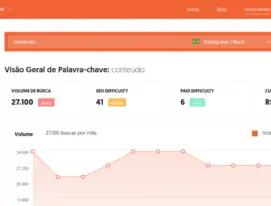
SEO Optimization Tools
As you work to improve your site's online visibility, there are many tools to simplify and improve this process.
Here are some useful tools for creating a Google-optimized website.
Tools to improve your keyword research
Keyword research is the first step in any successful SEO strategy.
There are several tools designed specifically to help you identify the best terms:
- Google Keyword Planner
- Ubersuggest
- KeywordTool.io
Tools to simplify on-page optimization
Optimizing the elements of a page (on-page factors) is an essential part of the SEO process. The following tool can help you ensure that you do this correctly:
- SEMrush (also very useful for off-page factors)
Tools to monitor your results
As you make changes to your site, it's important to evaluate the impact of these changes. These are two of the best tools for monitoring your results:
- Google Analytics
- Google Search Console
Don't forget to read our article on more free tools for SEO optimization.
Conclusion: Creation of a responsive website and creation of a website optimized for Google
Optimizing a website and making it responsive are complex and often challenging processes. That's why it's possible to rely on a website creation agency.
It takes time, planning and a lot of patience to achieve the desired results with search engine optimization.
But if you're willing to invest the necessary resources to create and execute a well-planned strategy, the results you'll see in terms of sales and revenue are worth it.
This can help increase your credibility, gain more traffic and improve your online visibility.
What's more, SEO is a great way to improve the overall experience your target audience has with your brand.
When you create content that meets their needs and then make it easily accessible via a Google-positioned website, your company becomes a reference.
As you work on optimizing your site and making it responsive, you can monitor your results using very precise metrics.
This means you won't have to worry about inefficiently allocating resources to strategies that don't work.
So don't forget that as well as choosing a good platform for creating your website, such as WordPress or Wix for example, it is necessary to keep in mind the creation of a responsive site and the creation of a site optimized for Google.
By taking all these issues into account, you will certainly achieve more significant results.

Caio Nogueira
Caio Nogueira is co-founder of UpSites and a reference in website development and SEO consultancy. With over 10 years' experience and more than 900 projects completed for brands such as KaBuM, UNIMED, USP and Nestlé, Caio stands out for his competence in digital project management.Caio has also been a guest author on influential digital marketing websites such as Neil Patel, Rock Content, Hostinger, Duda, Hostgator and Locaweb, where he has shared his expertise in SEO and content marketing.
See all posts



 Calculate Price Now

