

SEO for images: how to name images for SEO in 2026
Summary (TL;DR)
O SEO for images is an important technique for improving your site's visibility on search engines such as Google. By optimizing images, you can increase your site's traffic, as they are easier to find in image search. To do this, it is essential to use relevant images, name files with appropriate keywords, reduce file sizes for faster loading and ensure that images are responsive, i.e. fit well on different devices.
In addition, it's important to use ALT tags and descriptive captions to help search engines better understand the images and improve their ranking. Taking care of copyright and ensuring that images are new and unique are also important aspects. Thus, by following these optimization practices, your site can achieve a better performance in search results, resulting in more visitors and a better user experience.

A picture is worth a thousand words. This saying is on everyone's lips and is also relevant in digital marketing. SEO for images is part of on-page optimization, But the quality of the images and their incorporation into the site also contribute to Google's ranking.
Images optimized for SEO not only allow you to rank better in image search, but also ensure better overall visibility for your site. Along with text, images are one of the most important components of your website, as they are visible to users.
If an image is well positioned in Google image search, it can bring additional visitor traffic to the site. To do this, however, it must also be recognized and found on Google. You can find out how to optimize your images for search engines in the following article!
What is SEO for images?
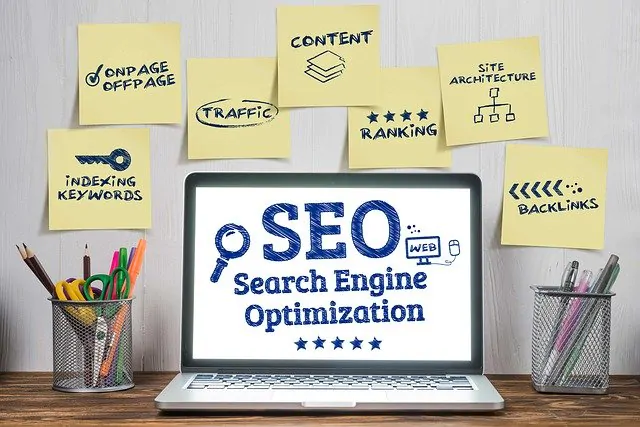
SEO (search engine optimization) refers to all the measures that are taken to obtain a better ranking, especially on Google, when a user makes a search query.
Image SEO in particular, optimizing image search. Google “likes” general search results with universal search elements. Images, videos or Google Maps results that match the search query.
For this reason, we want to briefly examine all the areas relevant to images on the Internet and present the most important measures for optimized images. These range from the actual images, their quality, format, etc. to on-page optimization (image attributes, surrounding text).
Image optimization helps SEO
Image optimization is a time-consuming process that can take a long time when you have a large number of files. However, the benefits of this hard work will be noticeable in the form of increased traffic to your site, resulting in increased conversions.
Following the tips above should increase the visibility of your images in the search engine, while at the same time slowing down page load times and improving search results not only for photos, but also for key phrases in general.
Unfortunately, in the context of image optimization, many people limit themselves to just filling in the ALT tags, which can bring satisfactory results, but with competitive phrases it's simply not enough. It's important to understand how images work in order to optimize them properly for Google.
How does SEO for images work?
Images are particularly easily captured by the human brain. They are therefore very suitable for grabbing the attention of a person with limited time.
The images are considered credible and perfect for arousing emotions. If a user comes across a result they like, in the form of an image, they can hardly defend themselves against their intuition and click on it.
Optimization before image upload
Before including your photos on the site, you should first consider some editorial and technical aspects:
Use appropriate images
If you use photos or illustrations on your site, they really should fit the content. Of course, it's best to take your own photos. Because they will be truly unique.
Alternatively, you can also buy photos from photo agencies or use photo suppliers on the Internet.
Choose a meaningful file name
Before including the image on the page, you should definitely check the file name. Because file names often don't make sense when you take photos yourself. The file nomenclature usually looks like this: IMG_12345.jpg
Unfortunately, this doesn't say anything about the photo. Therefore, you must choose a meaningful file name. Why? Search engines can understand the image better. Of course, relevant keywords should also appear in it. But please don't abuse it!
The .jpg, .gif, .png, .bmp and .svg file formats are generally suitable for use on websites.
Keywords always belong to the file name
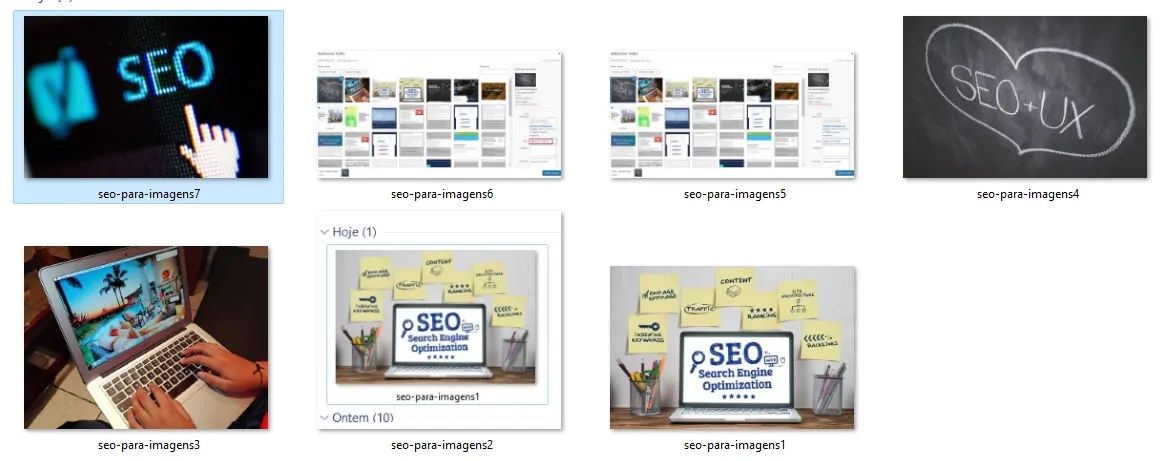
To optimize images, always name your images with the appropriate keyword. A keyword, which describes the image and the searcher's intention concisely and selectively, This requires the same effort as keyword selection for textual content. In most cases, the keywords are identical, so the image names are based on the page's own keyword.
For example, if you have a portal where you sell clothes, name the image accordingly. At best, indicate the type, brand name and color in the file name. In addition, the following general tips are recommended:
- Separate each word in the file name with dashes instead of underscores. This is easier for most programs to interpret.
- Always write in lower case. This doesn't directly promote SEO, but it does reduce the potential for errors when typing.
Image size for faster page speed
If you want to optimize your images for Google, you should also pay attention to file size. Because “heavy” images slow down your site. This bothers not only the search engines, but also the user. In addition, slow sites lead to poor rankings in search results.
It's best to use an image editing program to save the photo in the correct dimensions. This avoids unnecessary amounts of data. And the image doesn't need to be resized when the page loads.
Image ratio
We recommend that you use 4:3 image format. Image formats can also be enlarged up to 16:10. However, you shouldn't upload extreme deviations from these formats. Google will not consider them significantly or will reduce them in the search result, which can lead to a sub-optimal display.
Portrait or landscape?
Prefer landscape mode for Google image searches. The images in these representations fit exactly layout from Google and are displayed optimally.
Portrait format images are quickly lost between image widths and are not perceived as well. This only applies to Google images.
On Pinterest, for example, portrait images have a clear advantage, as they are particularly noticeable on the Pinterest layout and take up more visible space. So pay attention to the platform on which your photos should present their effects.
Make your photos compatible with mobile devices
At worst, an image that isn't mobile-friendly can give you a high bounce rate and low conversions. But at best, it can give you more ranking power and greater user involvement.
To optimize your photos for mobile devices, create responsive images. This means that the image will be scaled according to the size of the site, regardless of whether the user is using a computer or a cell phone.
SEO for website and blog images

If you incorporate your images into the content, you can now enrich them with context-appropriate keywords. But you shouldn't just keep the search engines in mind. First of all, you should always think about the website visitor.
Use the alt attribute correctly
The call alt tag for images represents an alternative text. This is displayed if the image cannot be displayed. Or also to visually impaired users.
The Alt attribute also helps search engines to “understand” the image better. Therefore, you should try to describe the image as accurately as possible. And, by the way, you allow the most important keywords to flow. Of course, you should also avoid keyword stuffing here.
Use subtitles
Captions are a short description directly below the image. This text is not really relevant for a pure image search. But it usually is very useful for the reader. Studies have found that caption text is read more often than the actual content of the page.
Image captions are read on average 300% more than the text itself, so not using them, or not using them correctly, means missing the opportunity to engage a large number of potential readers.
neilpatel.com
Include keywords in the caption
An appropriate caption can increase page views. The keyword should also appear here. The caption also provides additional space for copyright notices if the image was not created by you.
In addition to the caption, the text around the image is also important from an image SEO point of view. This is also used by Google to determine the relevance of the image.
Media URLs and attachments
By default, WordPress creates a separate page for each image uploaded. However, these attachment pages only contain the image and title. This is not recommended from an SEO point of view. Because over time you will have many pages containing so-called “thin content”. You will therefore have pages with no relevant content.
Text around the image
Google Bot also includes the text in the vicinity of your image in its analysis. That's why it's important that your images are placed in locations that also address the image's relevant keywords.
Try to include a subtitle with this and the keywords that are important to you in this context next to the image. The content of the written text related to the image is also analyzed and must be linked in some way to what is portrayed. How exactly the bot reads this and with what relevance the search engine includes this data in the ranking is unfortunately not yet known.
The more often an image is used, the better
If it's possible and makes sense in terms of content, put the same images on your site more often. Google always loves the same image in a topic, as it signals increasing importance to them. But be careful: only do this if it really makes sense in context.
Name the image title
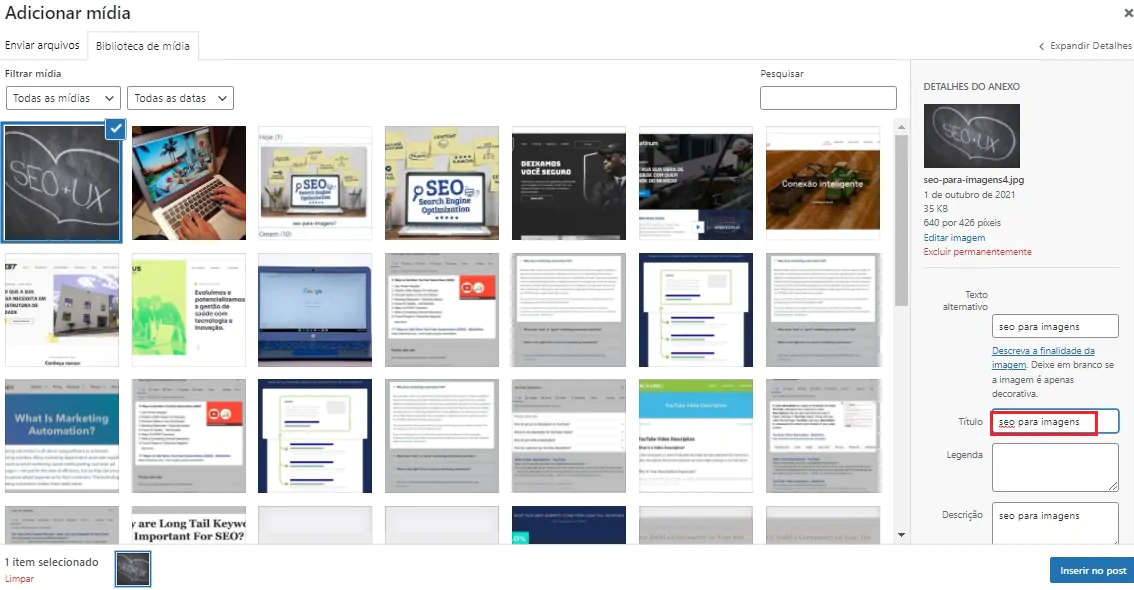
If you include your image in the domain, name the “Title” and the “Alt Attribute” with the same keyword when optimizing the image. This way, Google knows what the image is about or what it represents.
The title is not only useful for the search engine, but also for the user. When you hover over an image, a text field usually appears, displaying more information. The title tag is displayed to the user.
By the way: Google can now recognize parts of what can be seen in images. You can easily test how this works with image search by dragging any image into the search. The search engine can even interpret complex images.
Consider the age of the image
Since Google can (not yet fully) interpret the image, the search engine recognizes it using various parameters. This also includes the age of the image.
Google concludes: the younger, the more original and therefore the more interesting the contemporary content, the more value it has. Of course, this only makes sense if the photo has never been published on the web, otherwise Google will already know the correct date.
Beware of copyright
Whatever image files you choose, make sure there is no copyright conflict. If you don't own the copyright and the photo supplier owns the image you're using and you don't have a license to use it, you run the risk of expensive litigation.
This way, you can receive a notice if you infringe any copyright issues. If the content owner sees your content on their site, they can issue a takedown notice which you must comply with.
Conclusion
Bloggers in particular spend a lot of time preparing and doing on-page SEO for their articles. Images are often forgotten. Although this can provide more traffic through image search.
Another fundamental advantage of image optimization affects all website operators. Because when images are compressed, the site loads faster. And since Google prefers fast sites, they will also rank better. And that leads to more traffic. So SEO for images is always worthwhile!
Frequently Asked Questions
What is SEO for images?
SEO for images is the practice of optimizing images to improve their visibility in search results, especially in Google's image search. This includes using descriptive file names, adding ALT tags, reducing file sizes and ensuring that images are responsive for all devices.
Why is it important to optimize images for SEO?
Optimizing images for SEO is fundamental because it helps improve the site's ranking in search engines, attracts more traffic and provides a better user experience. Optimized images load faster and are more easily found by users in visual searches.
How to choose the best images for SEO?
Choose relevant, high-quality images that fit in with the content of your page. Whenever possible, use your own photos to ensure originality. If you use images from databases, make sure you have the rights to use them.
How important are ALT tags in images?
ALT tags are important because they describe the content of the image for search engines and for visually impaired users who use screen readers. A good ALT tag should be descriptive and include relevant keywords.
How to name image files for SEO?
Name your image files with clear descriptions and relevant keywords, separated by hyphens. Avoid using generic names like “IMG_1234.jpg”. A good example would be “camiseta-verde-algodao.jpg” to describe an image of a green cotton T-shirt.
Which image formats are best for SEO?
The most common and effective formats for SEO are .jpg, .png, .gif and .svg. Each format has its advantages, so choose the right one based on the quality of the image and the size of the file.
How does image compression affect SEO?
Compressing images reduces file size, which speeds up page load times. Pages that load faster provide a better user experience and are favored by search engines, improving the site's overall SEO.
How does the text around the image affect SEO?
The text around the image helps search engines understand the context of the image. It is important that the content next to the image is relevant and includes associated keywords, contributing to overall optimization.

Lucas Pelisari
Lucas Pelisari has been an SEO and content specialist at UpSites for over 6 years, working on the creation and optimization of digital strategies focused on lead generation and organic growth.With experience in website development projects, on-page SEO and link building, he works directly on structuring content and pages aimed at positioning on Google and acquiring qualified traffic.Throughout his career, he has worked on projects for companies such as Kommo, Aldanth, Physical Care, In4, Design.com, Adaptive, Clipto and YeSim, as well as several other clients served by UpSites.He works on projects in different niches, including technology, SaaS, services and local businesses, with a focus on performance, conversion and scalability.Her work is directly linked to lead growth and increased organic visibility, with projects that have seen consistent traffic gains after implementing SEO and content strategies.His content covers topics such as professional website creation, SEO, page structure, performance, user experience and digital growth strategies, always with a practical approach based on real market scenarios.Professional networks:LinkedIn: https://www.linkedin.com/in/lucas-widmar-pelisari-78920033/Instagram: https://instagram.com/lucaswidmar
See all posts


 Calculate Price Now

