

Why doesn't my site appear on Google?
Summary (TL;DR)
Today we're diving deep into the worrying question of why your website isn't showing up on Google. We'll explore everything from technical issues, like crawl errors, to the importance of quality backlinks and SEO strategies to improve online visibility.
As website creation and SEO specialists at UpSites, we understand the headaches that can arise when your website isn't easily found online. That's why we offer specialized solutions to ensure your site is correctly indexed and optimized for the best search engine results.
Remember, with the right strategies and our expert guidance, you can overcome these obstacles and significantly increase your online presence.
Today we're going to talk about something that plagues many website owners: the unexplained disappearance of their sites from search results on Google.
As a company specializing in website creation and search engine optimization, UpSites understands the vital importance of having a strong online presence. And if your website doesn't show up on Google, we have the right solution.
Being visible on Google is like having a bright neon sign advertising your business to the world. However, we also know that sometimes, even the best websites can struggle to appear in search results.
This frustration is something many of our clients face, which is why we decided to address this topic today.
Let's explore some reasons why your website might not be appearing on Google and provide some practical tips to resolve this issue.
So, if you've ever wondered why your website is lost in the vast ocean of the internet, you've come to the right place. Let's dive into this fascinating world of search engine optimization together!
Indexing problems
Indexing is the process by which search engines, like Google, collect and store information about web pages. In simple terms, it's like Google creating a giant catalog of the internet.
When you do a Google search, it's not searching the internet in real time.
Instead, it's searching its own index, which is an organized collection of web pages it previously crawled and indexed.
Now, why is that important? Well, it's simple: if Google doesn't index your site, it won't show up in search results.
Imagine owning an amazing store, full of fantastic products, but with no one to open it. That's pretty much what it's like when your website isn't indexed by Google.
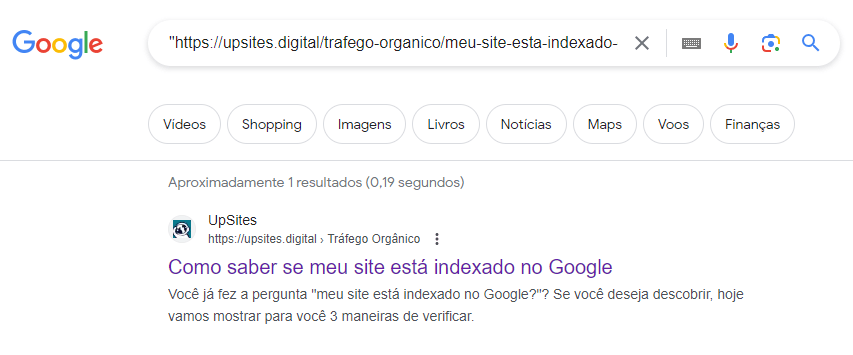
Can you tell if your The site is indexed on Google. placing in Google search with quotes: “www.yourwebsite.com.br”, if it appears, it means it is indexed.
But it's important for you to know that your home page might be indexed, and others might not be, so you can repeat the verification process page by page. This is the simplest way to check indexing.
But now, what are the possible indexing problems that might be sabotaging your website?
- Robots.txt file blocks: The robots.txt file tells search engines which pages on your site they can and cannot crawl. If there are incorrect instructions in this file, such as blocking access to important pages, your site may not be indexed correctly.
- meta robots noindex tags in HTML code Meta robots tags can also instruct search engines about indexing a specific page. If these tags are configured incorrectly, your site could be telling Google not to index your pages.
- Redirection problems Misconfigured redirects can confuse search engines and prevent them from crawling your site correctly. Make sure your redirects are set up properly and are not hindering Google's access to your pages.
Now, how can you verify if your website is being indexed correctly by Google? Here are some tips:
- Use the Google Search Console URL inspection tool: Google Search Console is a powerful tool that allows you to monitor your site's performance in search results. The URL Inspection tool can help you check if a specific page on your site is indexed by Google.
- Direct Google search: You can also perform a direct search on Google using the “site:” operator followed by your website's URL. For example, “site:yourwebsite.com”. This will show all the pages on your website that have been indexed by Google.
- Check the status of the robots.txt file: Ensure your website's robots.txt file is configured correctly and isn't blocking Google's access to your pages.
In summary, indexing issues can be a significant obstacle to your site's visibility in Google search results.
Be sure to resolve these issues as quickly as possible to ensure your site is indexed correctly and can thus reach your target audience.
Efficient solution when a website doesn't appear on Google: SCP Turbo
If you are looking for an effective and fast way to index your web pages, we present a practical and straightforward option that you can start using immediately.
We are talking about SCP Turbo, a tool that allows for fast and efficient indexing of any web page with just a few clicks.
After registering and logging into the platform, simply add your website. The procedure is extremely easy. Once the website is added, the tool starts its work, and in a short time, all your pages will be indexed.
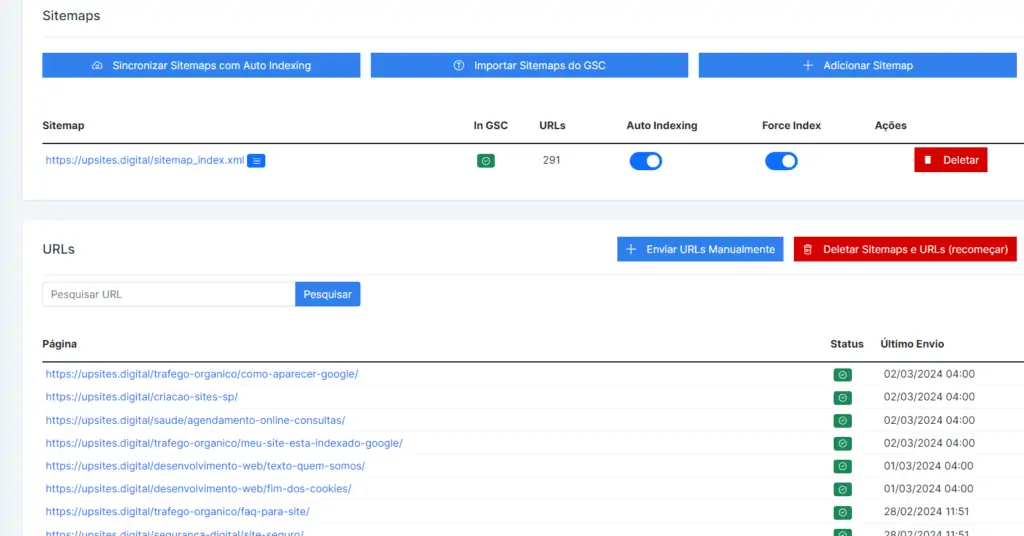
Example of using the SCP Turbo tool
Curious? Click the button below and try SCP Turbo right now!
Low-quality or duplicate content:
When it comes to visibility in Google search results, content is king. However, not all content is created equal. Low-quality or duplicate content can significantly impact your website's search rankings.
So, what is the impact of this type of content on search results?
Impact on Rankings: Google values relevance and originality of content. Low-quality content, such as superficial, poorly written, or error-filled articles, can harm your site's reputation in Google's eyes, leading to a drop in search rankings.
Google Penalties: Google actively penalizes sites with duplicate or low-quality content. This can result in a drastic reduction in your site's visibility in search results or even its complete removal from the Google index.
So, how can you identify and fix issues related to your website's content?
- Content audit: Conduct a full audit of your website's content to identify pages with low-quality or duplicate content. This may include checking pages with little text, content copied from other sites, or pages that do not offer real value to users.
- Rewrite or remove low-quality content: If you identify pages with low-quality content, rewrite them to make them more useful and relevant to your website visitors. If the content cannot be improved, consider removing it entirely from your website.
- Produce original and relevant content: Producing original and relevant content is fundamental to improving visibility in search results. Focus on creating content that is useful, informative, and interesting to your target audience. This not only helps attract more traffic to your website but also improves your reputation in Google's eyes.
- Avoid duplication: Avoid duplicating content from other websites and ensure that each page on your site has unique and original content. This helps to avoid Google penalties and improves your chances of ranking in search results.
In summary, low-quality or duplicate content can negatively impact your website's search rankings.
Identifying and fixing these issues is essential for improving visibility in search results and ensuring the long-term success of your website on Google.
SEO Problems (Search Engine Optimization):

SEO, or Search Engine Optimization, is the set of strategies and techniques used to optimize a website and improve its visibility in the search results of search engines, such as Google.
In essence, the goal of SEO is to make your website easier for users to find when they are searching for information related to your content or services. Now, let's cover some key points about SEO:
Relevance and positioning in search results
SEO is fundamental for your site's ranking in search results. The more optimized your site is for Google's relevance criteria, the greater the chances of it appearing in the top positions of search results.
Relevance is determined by a number of factors, including content quality, website authority, and user experience. By implementing SEO techniques, you are working to improve these aspects and, consequently, improve your website's ranking in search results.
Common SEO mistakes:
- Keyword stuffing Overstuffing content with keywords unnaturally can be interpreted as an attempt to manipulate search engines.
- Ignore user experience Sites that are difficult to navigate or load slowly tend to rank lower in search results.
- Neglecting the use of meta tags: Meta tags, such as title and description, play a crucial role in how your website is displayed in search results. Ignoring these tags or not optimizing them properly can harm your site's visibility.
SEO Best Practices
Keyword research: Identify the relevant keywords for your niche and integrate them naturally into the content of your site.
Content optimization Produce high-quality, relevant content for your target audience. This includes text, images, videos, and other media formats.
Link building: Build a quality link network that points to your website. This helps increase your site's authority in the eyes of search engines.
User experience improvement: Make sure your site is easy to navigate and provides a positive experience for users, regardless of the device they are using.
By implementing these SEO best practices and avoiding common mistakes, you'll be working to improve your website's search engine rankings and increase its online visibility.
Remember that SEO is an ongoing process and requires constant monitoring to ensure consistent long-term results.
Technical issues
When it comes to ensuring your website is easily crawlable and indexable by Google, it's crucial to address technical issues that might be hindering this process. Here's a discussion of some of these problems and how to resolve them:
Technical Problems and Google Tracking:
Google uses crawling bots to traverse the web and index website content. However, certain technical issues can hinder or even prevent this process.
If Google cannot crawl your site properly, your pages won't be indexed in search results, leading to reduced visibility.
Examples of common technical issues:
- Tracking errors: This can happen due to issues with the robots.txt file, which instructs search bots on which pages to crawl or not. If there are incorrect blocks in this file, important parts of your site may not be crawled.
- Incorrect redirects: Misconfigured redirects can confuse crawling bots, leading to indexing issues. For example, redirect loops or temporary redirects can harm Google's ability to crawl your site.
- Broken pages Pages that return 404 errors (page not found) can indicate to Google that your site is outdated or poorly maintained, which can harm your search ranking.
Troubleshooting recommendations:
- Check the robots.txt file: Ensure there are no unnecessary blocks preventing Google from crawling important parts of your site. Use the robots.txt tester in Google Search Console to check for issues.
- Correct redirects: Verify that all redirects are configured correctly and are not causing tracking issues. Use tools like Google Search Console to identify and fix incorrect redirects.
- Fix broken pages: Regularly monitor your website for pages returning 404 errors and fix them quickly. Redirect these pages to relevant URLs or remove broken links from your site.
By resolving these technical issues, you will ensure that your website is easily crawlable and indexable by Google, which can lead to a significant improvement in search result visibility.
Remember that regular maintenance of your website is essential to avoid technical problems and ensure good search engine rankings.
Lack of quality backlinks:
A lack of quality backlinks can have a significant impact on your site's visibility and authority in Google search results.
Backlinks are essential because they act as votes of confidence from other websites, signaling to Google that your site is a reliable and relevant source of information.
Here is a more in-depth discussion on the importance of quality backlinks and strategies for acquiring them:
Importance of quality backlinks:
High-quality backlinks are one of the main metrics used by Google to determine a website's authority and relevance on a given topic.
The more quality backlinks a site has, the greater its credibility in Google's eyes, and consequently, the better its ranking in search results will be.
Strategies for obtaining quality backlinks:
- Create relevant and valuable content: Produce high-quality content that is useful and interesting to your target audience. Relevant content tends to be naturally linked by other websites.
- Seek partnerships with relevant websites: Build relationships with other websites and blogs in your niche and look for collaboration opportunities, such as guest posts or link exchanges.
- Use social media Share your content on social media to increase your visibility and attract natural links from users interested in your content.
- Participate in online forums and communities: Contribute to discussions in forums and groups related to your niche and include links to your website whenever relevant and appropriate.
Impact of a Lack of Quality Backlinks on Your Website's Visibility
A lack of quality backlinks can result in a lower ranking in Google search results. Sites with few or no relevant backlinks tend to have lower authority and therefore less visibility.
Furthermore, the lack of backlinks can be interpreted by Google as a lack of credibility and trustworthiness, which can further harm your site's visibility.
To improve this situation and increase the quantity and quality of backlinks to your site, it is essential to invest in ethical and effective link-building strategies. Focus on creating valuable content, establishing partnerships with other relevant sites, and actively promoting your content on social media and in online communities. Over time, you will see an improvement in your site's visibility and authority in Google search results.
Conclusion:
On our journey to understand why your website isn't appearing in Google search results, we've explored a series of factors that could be affecting its online visibility. It's important to remember that the how long does it take for a website to be indexed can vary depending on several factors.
I hope the information provided was useful and clarifying.
It is important to remember that visibility in search results is fundamental for the online success of any company or project.
As specialists in website creation and SEO at UpSites, we understand the importance of a strong presence in search engines.
Our commitment is to help our clients overcome the challenges they may face in the digital world.
If you are facing difficulties with your website's indexing, remember that UpSites offers specialized solutions to help you ensure your site is correctly crawled and indexed by Google.
We are here to provide guidance, Indexing techniques and technical support to optimize your online presence.
Therefore, we encourage all website owners to evaluate and resolve any issues that may be impacting their visibility in search results. Stay up-to-date with SEO best practices and regularly monitor your website's performance in search results. With effort and the right strategies, you can achieve success and increase your online presence.
At UpSites, we are committed to helping you achieve your online goals.
Contact us today and discover how we can help you improve your website's visibility and performance in Google search results.
Together, we can take your website to the next level and achieve the online success you deserve.
Frequently Asked Questions
Why isn't my new website showing up in Google searches?
When a website is new, it can take some time for Google to find and index it. This is because Google uses search bots to crawl the web, a process that can be time-consuming. Ensure your website is well-structured, with an XML sitemap submitted through Google Search Console, to help speed up this process.
What does it mean for my website to not be indexed by Google?
If your website is not indexed, it means that Google has not included it in its database of crawled web pages. This can happen for several reasons, such as the presence of “noindex” directives on your site, access problems by the Google search bot, or simply because the site is very new and has not yet been discovered. Check how
How can I improve my website's visibility on Google?
Improving your website's visibility involves optimizing its content and structure for SEO (Search Engine Optimization). This includes ensuring your site is responsive (mobile-friendly), loads quickly, and contains relevant, high-quality content with appropriate keywords. Building quality backlinks, having a good URL structure, and using effective title tags and meta descriptions are also recommended practices.
How can I check if my website has been penalized by Google?
To check if your website has received a manual penalty, go to Google Search Console. There, you will find notifications of manual actions applied to your site, along with details about the issue and instructions on how to fix it and request a review.

Lucas Pelisari
Lucas Pelisari has been an SEO and content specialist at UpSites for over 6 years, working on the creation and optimization of digital strategies focused on lead generation and organic growth.With experience in website development projects, on-page SEO and link building, he works directly on structuring content and pages aimed at positioning on Google and acquiring qualified traffic.Throughout his career, he has worked on projects for companies such as Kommo, Aldanth, Physical Care, In4, Design.com, Adaptive, Clipto and YeSim, as well as several other clients served by UpSites.He works on projects in different niches, including technology, SaaS, services and local businesses, with a focus on performance, conversion and scalability.Her work is directly linked to lead growth and increased organic visibility, with projects that have seen consistent traffic gains after implementing SEO and content strategies.His content covers topics such as professional website creation, SEO, page structure, performance, user experience and digital growth strategies, always with a practical approach based on real market scenarios.Professional networks:LinkedIn: https://www.linkedin.com/in/lucas-widmar-pelisari-78920033/Instagram: https://instagram.com/lucaswidmar
See all posts
 Calculate Price Now

