

How do I know if my site is indexed on Google?
Summary (TL;DR)

We often focus on the day-to-day work and forget to take care of the small details of our business. One of these details can be about your website's indexing. Have you ever wondered, for example: is my website indexed on Google?
It may seem like something difficult to happen, but here at UpSites, we faced this problem until recently. From September 2023 to February 2024, our website was not indexing our blog posts.
This caused a major problem with our ranking for several pages, and especially for new ones that weren't ranking because they were not indexed. This caused us to lose several leads for almost 5 months!
Fortunately, we were able to resolve this situation, and today we are here to help you resolve it too!
Did your site stop indexing out of nowhere? Has it never indexed? Are you afraid of that happening and not knowing what to do? Keep reading our content and we'll show you how to solve this huge problem quickly and easily!
What is Website Indexing:
Google's website indexing is a fundamental process to ensure that online content is available and accessible to users worldwide.
In simple terms, indexing is the act of adding web pages to Google's database, allowing them to be found and displayed in search results when users look for relevant information.
See an example:

This is an example of a page indexed by Google.
Imagine that Google is a huge virtual library, and indexing is the process of cataloging and organizing all available books (or web pages) so they can be easily found by readers (or users).
A fundamental aspect of website indexing is the role of Google's crawlers, also known as Googlebots.
These bots are like digital explorers that continuously traverse the web, following links from one page to another and collecting information about the content of each page they find.
Crawlers analyze the text, images, links, and other elements of a web page to understand what it's about and determine its relevance to users' search queries.
Once Googlebot discovers a new page, it adds it to the Google index, making it available to appear in search results.
The importance of indexing for a website's online visibility cannot be understated. Without proper indexing, your site can be practically invisible to users searching for information related to your content.
By ensuring your website is indexed by Google, you significantly increase your chances of being found by users who are actively searching for what you have to offer.
This all makes indexing the crucial first step in putting your website in the web's spotlight and ensuring its online presence.
Methods for Verifying Indexing
There are several ways to check if a website is indexed by Google, each offering valuable insights into your site's online visibility status. Below, we explore three main methods to perform this check:
Google Direct Search:
A simple and direct method is to perform a direct Google search using the “site:” operator, followed by the URL of the website you want to check. For example, by typing “site:example.com” into the Google search bar, you will see a list of all pages on example.com that have been indexed by Google. See:

If your site appears in the results as in the image above, it means that at least some of your pages are indexed.
Google Search Console:
O Google Search Console It is a free tool offered by Google that provides detailed information about your website's performance in search results.
When checking your website in Google Search Console, you can access specific reports on indexing status, including how many pages have been indexed, if there are crawling issues, and much more.
Simply access Google Search Console, add your site, and check the indexing status in the coverage section.
robots.txt File Check:
- Create a robots.txt file: Use a plain text editor like Notepad or TextEdit. Save the file with the name “robots.txt”.
- Add rules to the robots.txt file: This file controls which parts of your website can be crawled by search engines. Each rule is an instruction on what to allow or block.
- Upload the file to the root of your website: The robots.txt file must be in the root of your website to function correctly. For example, if your website is www.example.com, the robots.txt file should be accessible at www.example.com/robots.txt.
- Test the robots.txt file: After uploading, check that it is publicly accessible and that search engines can crawl it.
Here's a simple example of a robots.txt file:
Makefile
Copy code
User-agent: Googlebot
Disallow/nogooglebot/
User-agent: *
Allow: /
Sitemap: https://www.example.com/sitemap.xml
What does this mean?
- Googlebot cannot crawl URLs that start with https://example.com/nogooglebot/.
- Other user agents can crawl the entire site.
- The website's sitemap is at https://www.example.com/sitemap.xml.
Ensure you follow formatting and localization guidelines to make sure the robots.txt file works correctly. If you have questions on how to do this, please contact your hosting company.
Remember that indexing is just the first step to a successful online presence, and it's important to continue monitoring and optimizing your website to ensure its continued relevance and visibility.
Troubleshooting Indexing:
Getting your site indexed by Google can be a complex process and sometimes obstacles arise that can prevent your pages from being properly indexed. Here are some common issues that can affect the indexing of your site and suggestions for resolving them:
Errors in robots.txt file:
The robots.txt file is a powerful tool for controlling Google crawler access to your site. However, errors in the robots.txt file can inadvertently block crawlers from accessing important parts of your site.
Check your robots.txt file for errors and make sure you are not accidentally blocking access to pages you want to index.
Correct any errors found to ensure your website is fully accessible to Google crawlers.
Tracking Problems:
If Google encounters problems crawling your site, it can affect its ability to properly index your pages.
Check for tracking issues using Google Search Console and resolve any identified problems, such as broken pages, incorrect redirects, or slow page loading speeds.
Keeping a website clean and well-organized can make it easier for crawlers and improve your site's indexing.
Google Penalties:
In some cases, your website may be penalized by Google for violating its quality guidelines. This can result in a decrease in your website's ranking in search results or even complete removal from the Google index.
If you suspect your website has been penalized, check Google Search Console for any penalty notices or messages and take the necessary steps to correct any issues with Google's guidelines.
When facing website indexing issues, it's essential to act quickly to resolve any problems and ensure your site is properly indexed by Google.
By correcting errors in your robots.txt file, resolving crawling issues, and ensuring compliance with Google's guidelines, you can maximize your website's online visibility and achieve better search engine results.
Always remember to regularly monitor your website's indexing status and take proactive measures to resolve any issues that may arise.
I've already done all of that and it didn't solve it, so now what?!
Now we have our golden tip! If none of what we've discussed solves your problem, you can use an indexing tool.
We also tried to index our posts in all the ways shown in this post, but nothing worked. Then we discovered a method that forces indexing and that worked in a few hours. This method uses the tool SCP Turbo.
Take a look at a screenshot with our results:
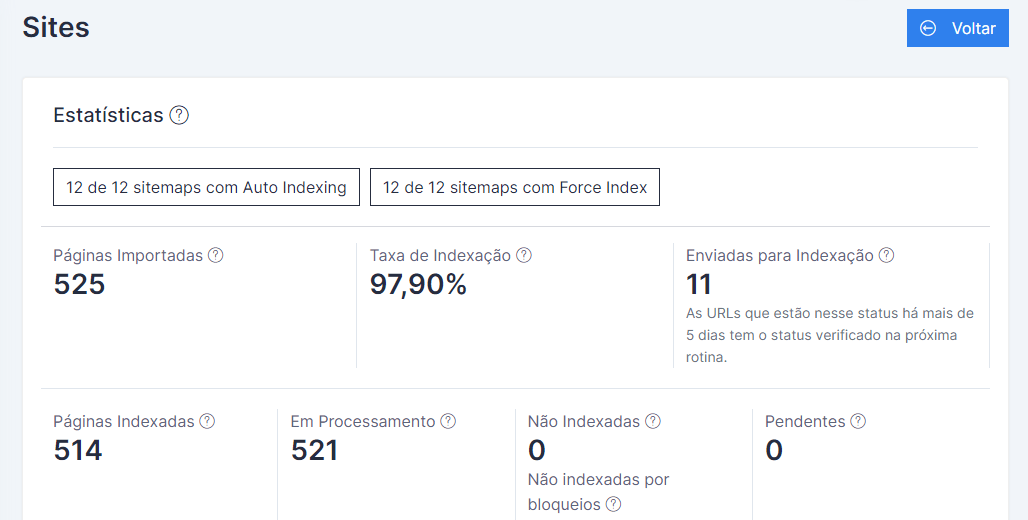
According to the tool's website itself, it works as follows:
“When you connect and activate a site for the first time, we fetch all your URLs, check the index status of up to 2,000 of them, and extract your search analytics data from the past 30 days.
After that, we monitor your URLs daily for new pages, new index statuses, and new search analytics data.”
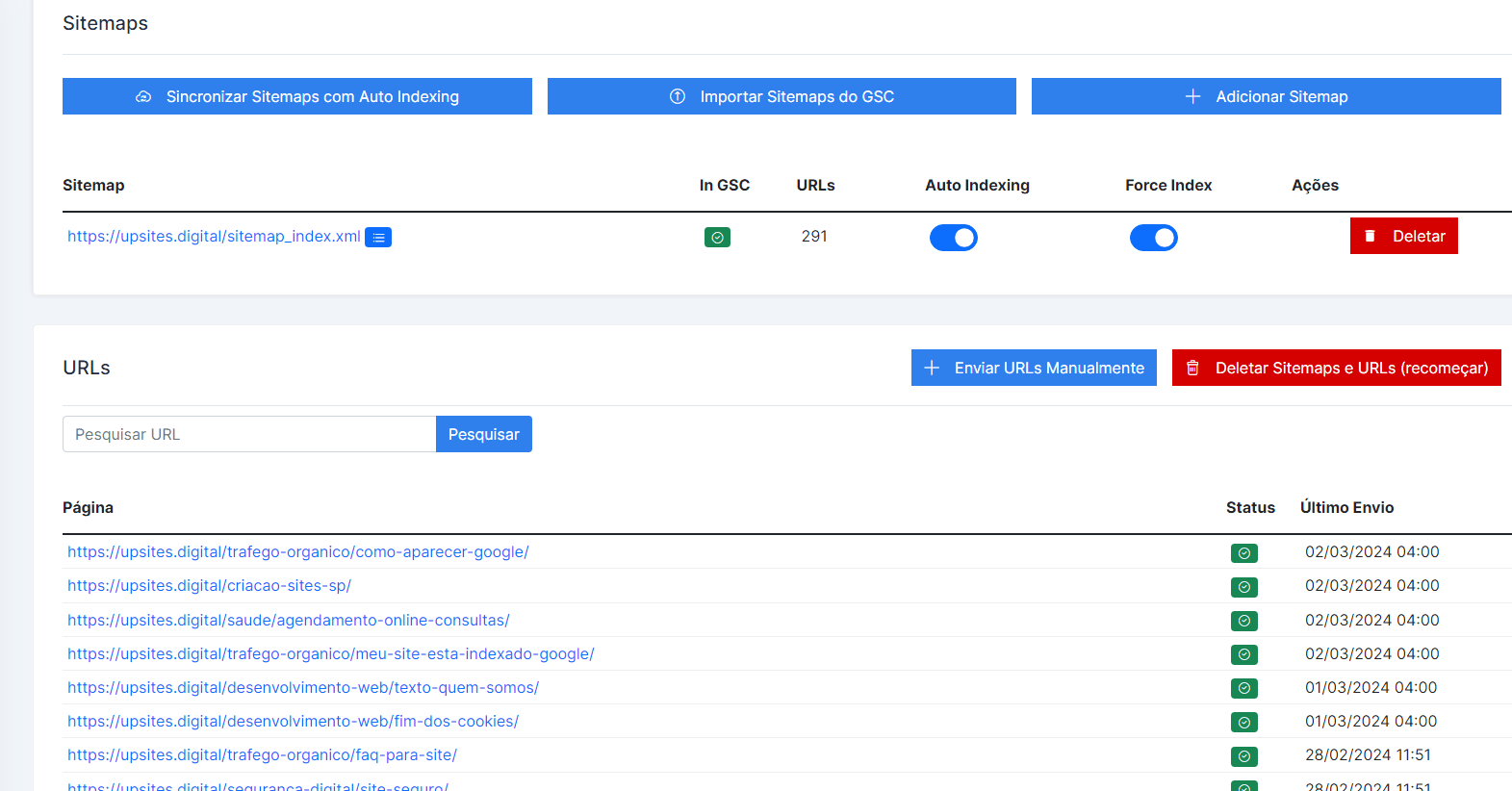
There you will log in with your account and register your site. The process is very simple. Once the site is registered, it will start working, and soon all your pages will be indexed.
Conclusion:
As we reach the end of this article, it is important to recap the main points discussed about indexing websites on Google.
Indexing is the fundamental process that allows your site to be found and displayed in search results, thus ensuring your online visibility and your ability to attract qualified traffic.
We highlight the importance of regularly checking your site's indexing to ensure its visibility in Google search results.
Through methods such as direct Google searches, using Google Search Console, and checking the robots.txt file, you can monitor your website's indexing status and identify potential issues affecting its online visibility.
Finally, we strongly encourage website owners to use tools like SCP Turbo and the methods presented in this article to check and troubleshoot their websites' indexing in Google.
By taking proactive steps to ensure your website is properly indexed, you can maximize your online presence and achieve better results in Google search rankings.
Always remember that indexing is just the first step towards an effective online presence.
Continuing to monitor and optimize your website is essential to ensure its ongoing relevance and visibility.
With effort and dedication, you can ensure your website stands out in the online landscape and reaches its full success potential.
Frequently Asked Questions
What is website indexing in Google and why is it important?
Website indexing in Google is the process by which Google adds your pages to its database, making them available to appear in search results. It is important because it ensures that your website can be found by users searching for relevant information, increasing visibility and driving qualified traffic to your business.
How can I check if my website is indexed on Google?
There are several ways to check if your website is indexed by Google:
- Google Direct Search: Type “site:site.com” in the Google search bar to see all indexed pages.
- Google Search Console: Use this free tool to access detailed reports on your website's indexing status.
- robots.txt File Check: Make sure this file is not blocking Google crawlers from accessing your important pages.
What to do if your site isn't being indexed by Google?
If your website is not being indexed, follow these steps:
- Check and correct the robots.txt file to ensure you're not blocking important pages.
- Use Google Search Console to identify and correct tracking issues.
- Fix duplicate content issues using canonical tags.
- If necessary, utilize ferramentas como a SCP Turbo to force the indexing of your pages.
How can SCP Turbo help with my website's indexing?
SCP Turbo is a tool that can quickly and efficiently force the indexing of your website's pages. When you register your website with the tool, it checks the indexing status of your URLs and monitors new statuses and analytical data daily. This helps ensure that your pages are indexed and visible in Google search results within a few hours.

Lucas Pelisari
Lucas Pelisari has been an SEO and content specialist at UpSites for over 6 years, working on the creation and optimization of digital strategies focused on lead generation and organic growth.With experience in website development projects, on-page SEO and link building, he works directly on structuring content and pages aimed at positioning on Google and acquiring qualified traffic.Throughout his career, he has worked on projects for companies such as Kommo, Aldanth, Physical Care, In4, Design.com, Adaptive, Clipto and YeSim, as well as several other clients served by UpSites.He works on projects in different niches, including technology, SaaS, services and local businesses, with a focus on performance, conversion and scalability.Her work is directly linked to lead growth and increased organic visibility, with projects that have seen consistent traffic gains after implementing SEO and content strategies.His content covers topics such as professional website creation, SEO, page structure, performance, user experience and digital growth strategies, always with a practical approach based on real market scenarios.Professional networks:LinkedIn: https://www.linkedin.com/in/lucas-widmar-pelisari-78920033/Instagram: https://instagram.com/lucaswidmar
See all posts


 Calculate Price Now

