

How not to index your page in Google and prevent it from appearing in searches
Summary (TL;DR)
Find out how to protect data and optimize your site's SEO with index control techniques!
Here you will learn what it means to index a page on Google, the strategic reasons for opting out of indexing and the main methods for ensuring that only relevant content appears in search results. From avoiding penalties for duplicate content to protecting private or temporary areas, the text explains how to implement essential practices for the efficient management of your site.
We explore indispensable tools such as noindex meta tags, robots.txt file settings and Google Search Console, showing how to use them practically and effectively.
With insights into common mistakes and recommendations from plugins like Yoast SEO, you'll have all the information you need to ensure that your site is always optimized, secure and in line with SEO best practices. Check it out and take control of your online presence!

With more than 8 billion searches processed daily, Google is one of the biggest engines of opportunity for boosting sales, increasing a brand's visibility and attracting new audiences. But despite this huge volume of searches, there are situations in which you may want to not indexing the page in Google.
Whether it's to protect private data, keep test areas under the radar or avoid penalties for duplicate content, choosing not to index a page can be decisive for the management of a website. The process may seem technical, but it is essential for those who want to have more control over what is displayed in searches.
Do you want to know how this works and the reasons for adopting this practice? Keep reading and check out the full article!
What does it mean not to index a page?
Indexing a page means allowing search engine robots to, These robots, such as Google, read and add that page to the index of results displayed to users. These robots, also called crawlers, They browse websites, analyze the content and determine whether or not it should be shown in a search.
Indexed pages appear in the results, while non-indexed pages are intentionally blocked, whether for technical or strategic reasons.
Opt for not indexing a page in Google can be an important decision to protect data, avoid confusion with duplicate content or keep irrelevant pages out of the public eye. Let's take a look at some of the most common reasons for this choice:
Test areas
The test areas of a website are used for experimentation, adjustments and reviews of functionality. These environments usually contain provisional or incomplete content, which should not be displayed in search results.
Leaving these pages indexed can cause confusion for users and even harm the site's SEO. Blocking indexing of these areas helps to ensure that only the final and approved content is visible.
Duplicate content
Duplicate pages can be detrimental to SEO, as they confuse search engines about which version to prioritize in the results. When a site has repeated versions of the same page or content, the best practice is to prevent duplicates from being indexed.
This can be done with the use of meta tags or adjustments to robots.txt file, ensuring that only the main version appears in search engines.
Private pages
Not all content on a website is intended for the public. Pages with sensitive information, such as internal data, administrative portals or confidential documents, need to be protected.
Blocking the indexing of these pages is essential to prevent them from being accessed by unauthorized users or inadvertently displayed in search results. In addition, this practice reinforces the security and privacy of the site.
Main methods to avoid page indexing
If you need to prevent certain pages of your site appear in search results, There are effective methods for this. Below, we will detail the main strategies, such as using meta tags noindex, configure the robots.txt, use Google Search Console and implement HTTP headers.
Each of these techniques has its own particularities and can be applied according to the needs of your site. Let's go?
Meta tag noindex
The noindex meta tag is one of the most direct ways of preventing a page from being indexed by search engines. This tag is added to the HTML code of the page and instructs search robots to ignore the content during indexing.
To implement this, simply include the following code in the <head> of the page you want to hide:

This tag can be combined with other attributes, such as “nofollow”, This prevents robots from following links within the page. A practical example of this would be on thank-you pages after a purchase, where indexing adds no value to the user and can even cause confusion.
robots.txt file
O robots.txt file is an important tool to control search engine robots' access to your site's pages. It works as a guide that instructs which URLs can and cannot be accessed by crawlers.
To block specific pages, you can use the command Disallow in the robots.txt file, as in the example below:
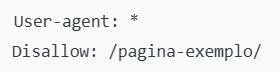
It is worth noting that Disallow prevents robots from accessing the URL, However, this does not prevent it from being indexed if it has already been found by another method, such as external links. For greater security, it is recommended to combine the use of meta tags noindex with robots.txt.
Google Search Console
O Google Search Console is a powerful tool for managing your site's presence in search results. It allows know if the site is indexed and possible indexing problems.
If a page has already been indexed and you want to remove it, Search Console offers a specific feature for this.
On the dashboard, go to “Removals” and then “New Request”, as in the image below:
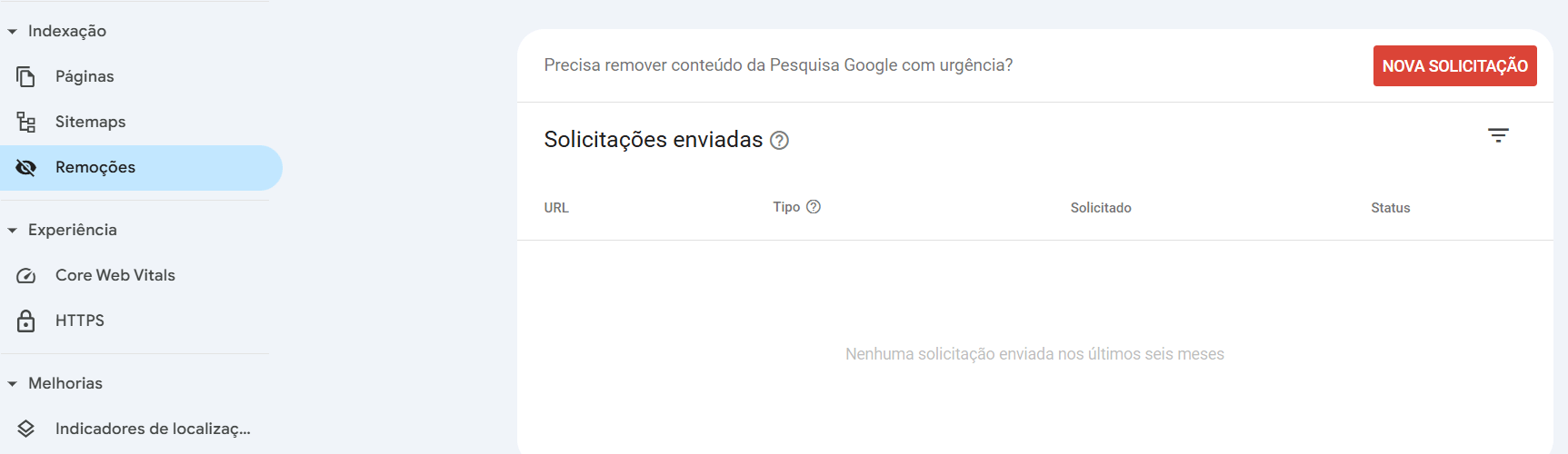
Enter the link of the page you want to hide, check the desired option below and confirm with “Next”.
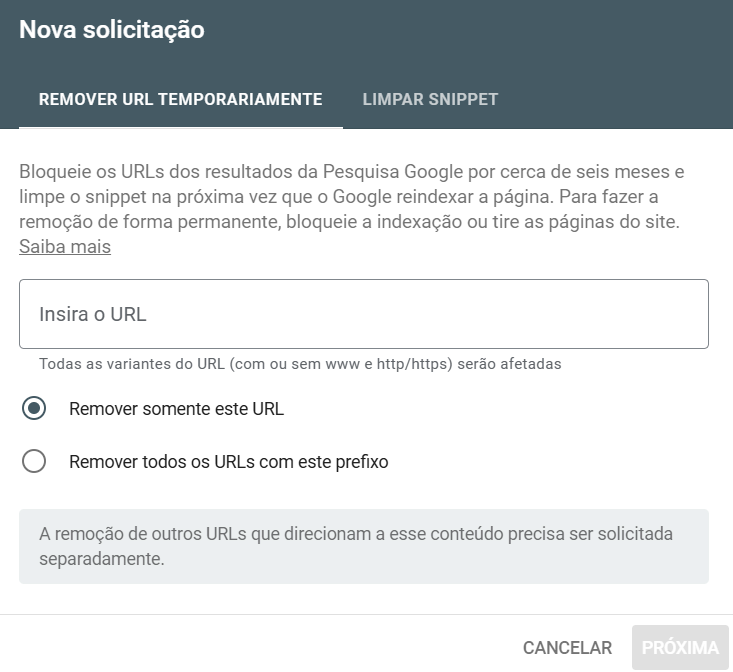
In addition, you can monitor whether pages are blocked correctly or whether there are any indexing problems. This method is ideal for temporarily removing content while you adjust the settings on your site.
HTTP headers
Another way to prevent pages from being indexed is to use HTTP headers on the server. This technique is configured directly in the web server, such as Apache or Nginx, and instructs robots not to index the page when they access it.
To implement this, simply add the following line to the server's configuration file:

This method is particularly useful in situations where you don't have direct access to the page's HTML code or want to apply the rule globally to an entire category on the site.
Scenarios in which not indexing makes sense
There are specific situations in which deindexing a URL on Google is the best choice for protecting information, avoiding confusion or improving SEO performance. For example, login or administrative pages do not need to appear in search results, as they are only intended for internal users and could pose security risks if exposed.
Another scenario is duplicate content control, This can cause search engine penalties. If the same content appears on several pages of your site, search engines may not know which one to prioritize, affecting your authority.
Finally, temporary pages, such as landing pages or specific campaigns, can be hidden to prevent users from finding them before the time is right.
Tools and best practices for managing indexing
For WordPress sites, plugins such as Yoast SEO e RankMath are indispensable for managing page indexing. They allow you to apply the noindex meta tag directly from the WordPress interface, without having to edit the code manually. In addition, they offer SEO information that helps to keep your site optimized.
Tools such as Google Search Console are also useful for monitoring and preventing indexing. It allows you to check which pages are blocked, identify problems and correct them quickly. The use of plugins combined with Search Console forms a robust strategy for managing indexing.
Common mistakes when trying to avoid indexing
When setting up page deletion, it's important to avoid mistakes that could jeopardize your goals. A common mistake is incorrectly setting the noindex meta tag, It's also important to keep in mind that you can only apply it to parts of the site or completely forget about it on pages that need to be hidden.
Another frequent problem is inappropriate use of robots.txt. Many administrators try to block already indexed content using only the Disallow, This does not remove URLs from Google results. To do this, it is necessary to combine methods, such as using tools to block indexing and removal requests in Search Console.
In addition lack of monitoring is a critical mistake. Without follow-up, you may not realize that sensitive pages have been re-indexed, compromising your site's privacy or strategy.
Final thoughts - How not to index your page on Google
Preventing pages from being indexed in Google is a fundamental practice for protecting sensitive information, optimizing SEO and controlling the content displayed in search engines. The use of tools such as SEO plugins, Google Search Console and robots.txt settings can facilitate this process.
Remember to regularly review your site's indexing settings. Frequent adjustments ensure that your most important pages are being prioritized in search results, while those that shouldn't be displayed remain effectively hidden.
Make sure your site is always optimized and secure with UpSites, Talk to our experts and take your online presence to the next level!
Frequently Asked Questions
What is an unindexed site?
An unindexed website is one that search engines, such as Google, do not display in search results. This can be due to intentional settings, such as the use of meta tags noindex, blockages in the robots.txt, or even due to technical problems that prevent crawling and indexing.
How do I know if my site has been indexed?
You can check whether your site has been indexed on Google by typing site:seudominio.com in the search bar. This will display all the pages on your site that are currently indexed. Tools such as Google Search Console also provide detailed information on site indexing.
How can a site not be indexed on Google?
In order not to index a site on Google, you can use the meta tag noindex, configure the robots.txt to block access by search robots, or adjust the settings directly in Google Search Console. These practices ensure that site pages are not displayed in search results, protecting sensitive or irrelevant information for the public.
How to remove Google indexing?
To deindex an already indexed page or site, go to Google Search Console and use the “Removals” tool. Enter the link of the page you want to remove and request its temporary deletion. Also, apply the meta tag noindex and adjust the robots.txt to prevent the page from being crawled again.

Lucas Pelisari
Lucas is an SEO specialist at UpSites. He has helped several companies climb the google rankings and is always improving his skills. He is also a digital marketing enthusiast and always tries to keep up to date with the digital world.
See all posts



 Calculate Price Now

