

Google Analytics 4: What's changed?
Summary (TL;DR)
In this post, we cover the main changes brought by Google Analytics 4 (GA4), the new version of Google's digital marketing monitoring and analysis tool.
We discussed the fundamental differences between GA4 and Universal Analytics, such as the transition from a session-based model to an event-based model, and the importance of migrating to GA4 before Universal Analytics stops processing new data.
We emphasize the need to correctly configure the new property in GA4 to ensure the continuity of data collection and analysis, and we offer tips on how to make this transition effectively.

Google Analytics 4 (GA4) is the latest version of Google Analytics (GA), Google's free digital marketing monitoring and analysis tool.
GA is the most used platform in the world for collecting data on access, behavior, and navigation on websites. It's no wonder that the launch of its new version, in October 2020, has been generating heated debates worldwide.
Especially after Google announced that the current version of the platform, Universal Analytics – also called “classic Analytics” or GA3 – will be discontinued at some point. And that GA Universal data will not be migrated to GA4.
This means that, as of July 1, 2023, Universal Analytics will no longer process new data. If you do not configure your website for GA4, you will lose access to your most up-to-date statistics.
And the longer you wait to start collecting data in GA4, the less data you'll have for historical analysis.
Here at Duda, We are closely monitoring these changes. In this article, we will help you understand what is changing, why it is changing, and how to prepare.
What is Google Analytics 4?
As the name suggests, GA4 is the fourth generation of Google's monitoring tool. Today, GA4 is the default version of Google Analytics. If you create a new account in the tool, it will automatically be created in GA4.
After almost 15 years with Google Analytics Universal running, Google needed to adapt to new market realities, such as end of cookies of third parties and increasingly strict user privacy restrictions.
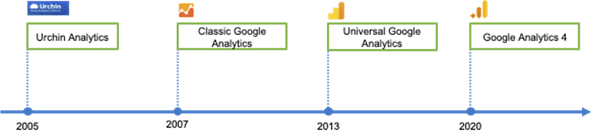
In addition, Google needed to release a new version of GA that also catered to the growing app market.
While Universal Analytics only tracks website data, GA4 was designed to analyze data from multiple devices and tools. GA4 allows you to measure data from websites, apps, and web + apps.
Inclusive, “Web+App” was the first name given to GA4, in its beta version.
In other words, it's useful for those who have websites, those who have apps, or those who have both.
Is GA4 capable of measuring customer journey across multiple devices in an integrated way. Its new reporting and exploration features offer smarter, more flexible ways to examine data.
In summary, it offers a more complete view of the user across multiple channels, combining the insights we all know from Universal Analytics with Firebase's data model.
Universal Analytics versus Google Analytics 4
As we've seen, GA4 doesn't just change the tool's interface. It changes the entire way of capturing data and creating reports.
While Universal Analytics' data model is session-based, Google Analytics 4's data model is event-based.
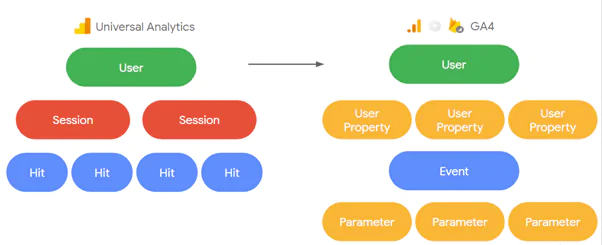
What does this mean?
Most Universal Analytics data is sent in the form of pageview hits. This means that each time a website page loads, the Google Analytics code loads with it.
GA4 collects its data through events. These are the interactions a user performs on your website or app, such as clicking on a menu, scrolling down the page, or performing a site search.
All actions that the user performs within the website or app are events for the tool. In GA4, everything is based on this and no longer on pageviews. Each event is differentiated by means of a parameter, and these events are the basis for report generation.
Another difference is regarding sampling. In Universal Analytics, default reports do not use sampling. However, sampling occurs if you apply secondary dimensions, segments, or other queries to your dataset.
In GA4, there is practically no sampling. Sampling only occurs if you exceed 10 million events when creating an advanced report in the Explore/Analyze section, and the created report is not a pre-existing standard GA4 report.
To learn more, check out this detailed article that Google Support prepared about the Differences in Universal Analytics data to GA4.
Reports in Google Analytics 4
In practice, with Universal Analytics, we just need to install the pageview tag to have practically 70% of the reports ready.
As for GA4, at the time of writing this post, it comes with few events configured by default in the tool, as per the list below.
This means you need to have a measurement plan to know what is important for your business and set everything up in GA4. Otherwise, you will miss information when it's time for analysis.
In GA4, there is no longer a page tag or e-commerce tag. There is only the event tag. However, while in Universal Analytics each event had only 3 content parameters and one value parameter, in GA4 it can have up to 25 parameters.
In practice, you need to pay much more attention to tagging and carefully choose which fields and parameters will be used for report generation. GA4 requires greater knowledge of fields, metrics, and dimensions. And more strategic thinking.
In the beginning, it will be difficult to get the same reports, as people are used to the numerous standard reports in Universal Analytics and some engagement metrics.
How to migrate to Google Analytics 4
Due to these very important changes in how data is captured and reports are generated, it is not possible to migrate data from Universal Analytics to GA4.
Therefore, if you are currently using Google Analytics to track your website statistics, the recommendation is to start collecting data on GA4 as soon as possible.
IMPORTANT: The ideal approach is to set up the new property in GA4 and continue using the old property in Universal Analytics. This way, you can use the data from the old version while exploring the features of the new version.
After setting up the GA4 property in your account, verify that the two versions are working together. Log in and open the new property to check if data has been collected for reporting in this new environment.
The experts' recommendations for this transition period are as follows:
- Place the GA4 tracking code and monitor both properties (GA4 + Universal Analytics).
- Tag the events in both.
- By default, GA4 accounts only show 2 months of history, but it's possible to configure it for a longer period of time.
- The sooner you start using GA4, the better. It will already show your history and basic attribution model.
- For new sites, one option is to create properties in both Universal Analytics and GA4. GA4 is already fully operational, but there are still many features and innovations that need to be added.
Don't forget to evaluate your current structure and study how to create a new structure within GA4. If necessary, enlist the help of a digital agency You are an expert.
Google Support brings a Step-by-step setup of GA4 For whom
- you are using Analytics for the first time;
- already use Universal Analytics;
- use one website creator or CMS like the Duda.
What happens if your website doesn't migrate to Google Analytics 4?
In July 2023, Universal Analytics properties, the “classic” Analytics, will stop processing data. After that, Google guarantees that you will still be able to access your data for a period of at least six months.
The recommendation is that you export your historical reports, as at some point not yet defined by Google, Universal Analytics will be completely deactivated. On this expiration date, you will no longer be able to see your reports directly on the platform or access your Universal Analytics data via API.
In other words, there is no option to continue using Universal Analytics. If you don't migrate to GA4, you will eventually lose access to the tool.
Therefore, create a new property in GA4 as soon as possible so that data collection and measurement begin from scratch. Due to the profound changes in data collection, your previously created reports will no longer be available and cannot be copied.
In return, Google promises new insights and personalized reports that will help you discover more about your site's persona. It also promises a more democratic version of Analytics, which should cater to both beginner and more advanced users.
Frequently Asked Questions
What is Google Analytics 4 (GA4) and why was it launched?
Google Analytics 4 (GA4) is the fourth generation of Google's monitoring tool, designed to handle new market demands such as the end of third-party cookies and privacy restrictions. Furthermore, GA4 allows for cross-device data analysis, including websites and apps, providing a more complete view of user behavior.
What are the main differences between GA4 and Universal Analytics?
The main difference between GA4 and Universal Analytics is that GA4 uses an event-based data model, while Universal Analytics is session-based. This means that in GA4, all user interactions, such as clicks and page scrolling, are treated as events, offering greater flexibility and depth in reporting.
How can I prepare for the transition from Universal Analytics to GA4?
To prepare for the transition, it is recommended to set up the new property in GA4 as soon as possible and monitor both systems in parallel (GA4 and Universal Analytics). This will allow you to familiarize yourself with GA4's new features while still having access to Universal Analytics data.
What happens if I don't migrate to GA4 by July 2023?
If you do not migrate to GA4 by July 2023, Universal Analytics will stop processing new data, and you will lose access to updated statistics. Additionally, Universal Analytics will be fully decommissioned at some point, and you will no longer be able to access your old data, making the transition to GA4 essential.

Carol Cordioli - Guest Author
See all posts



 Calculate Price Now

