

Website Maintenance 2025: How to take care of your website the right way
Summary (TL;DR)
Maintaining websites, blogs and digital platforms involves continuous adjustments and optimizations to ensure security, functionality and growth.
It's important for avoiding costly problems, improving SEO, keeping the site up to date and maximizing the number of visitors. The process includes checking site speed, correcting images and content, ensuring responsiveness, protecting against attacks and implementing marketing strategies.
Without maintenance, websites can face costly downtime and loss of customers. Therefore, investing in regular maintenance is essential for the success and long-term sustainability of any website.
The maintenance of websites, blogs and digital platforms provides for content adjustments and optimizations, layout, It also ensures the security of the website, navigation, software and many other related factors. Among its many advantages, this work guarantees the security, continuity and growth of the content strategy adopted by the company.
However, this topic is still little discussed among marketing professionals and entrepreneurs. There are still people who believe that simply creating a page is enough, but consistent results can only be seen when continuous improvement efforts are made.
Invest in site maintenance, make regular updates, promote SEO improvements and, most importantly, protect your site to avoid the risk of wasting all your time and money invested.
This article will show you the main aspects of website maintenance to look out for once your site is live. Don't forget that all these points are fundamental to the website success. Without this plan, it's easy to get off course, get discouraged and fail to move the site in the right direction.
Why is website maintenance important?

To avoid future problems, website maintenance is essential. The right maintenance services can do more than simply keep your site running. They can also improve the overall experience on your site and enhance your company's growth.
For example, a company can add pages and functionalities as it grows in the market. In this way, it can share its news and manage its content better and better.
Website maintenance seems like an easy step to skip if the budget is tight. Why not just pay for the website creation agency and then let the site run on its own until it starts having problems? Isn't it cheaper to solve problems than to prevent them?
However, things don't work that way. Just as a badly looked after car can lead to extensive and expensive repairs, so too can a neglected website lead to extensive and expensive fixes, as well as long periods of downtime that cost you customers and money.
Here are just a few of the reasons why website maintenance is an important aspect of any successful website:
- Website maintenance avoids costly problems;
- Website maintenance can improve your search engine optimization;
- Website maintenance keeps your site up to date and attractive;
- Website maintenance maximizes the number of visitors your site can handle.
Core elements of your website maintenance plan
First of all, before understanding how website maintenance really works, it is very important to create a document in order to control website management.
This document doesn't have to be incredibly fancy. Even something as simple as a Google Drive DOC that your whole team can access, or a large Trello task list, will make a big difference.
Think of it as a comprehensive to-do list that will help your site succeed in the future. If you have a team working on your site, this can be a great way to give people an idea of the long-term vision and at the same time be able to break it down into actionable daily or weekly tasks.
If you have a web design agency, You can skip this step. But otherwise, it's very important!
Want a quote for website maintenance? Talk to UpSites!
Request a Quote
How to maintain a website
Here's how you can maintain websites through updates and management.
1. clear all post-launch tasks
Launching a website can take a lot of energy and effort. However, once the period of happiness and relief is over, it's time to get back to work. As website launches are usually very stressful, it's likely that some crucial errors on your site have slipped through the cracks.
It is therefore important to correct them as soon as possible. Below you'll find the main mistakes that may have gone unnoticed. Of course, in an ideal world all these steps would have been completed before the launch, but there's no problem if something has been left behind.
What really matters is making the changes as quickly as possible.
Check website speed
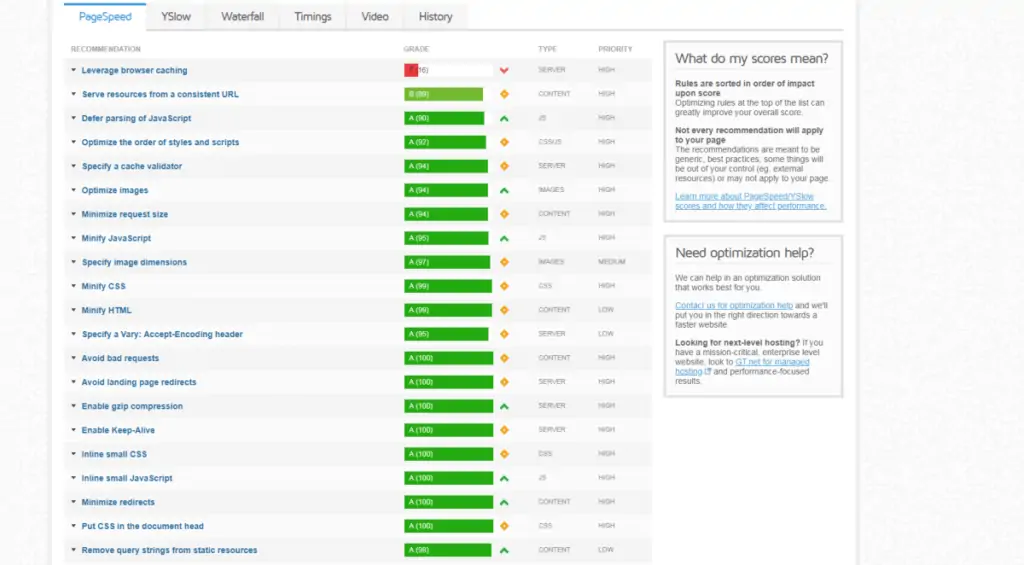
Having a site that loads quickly will improve your user's overall experience and help you rank higher in search engines. To get started, use a tool like GTMetrix or Google Pagespeed Insights to see your site's current performance.
Make sure you have a schedule that includes regular checks to ensure that your performance isn't diminishing over time.
Check all the images
Sometimes the images may be the wrong size or there may be some duplicates. Search the site to make sure all the images are correct.
To increase your site's speed even further, you can use a tool such as TinyPNG to compress your images before uploading them.
Review the content
If you've launched your site in a hurry, your content may still contain errors that will affect your visitors. Some basic things to look at include checking all your content for spelling mistakes and incorrectly used words, ensuring that the content is properly optimized for search engines.
Here you can already see how useful it can be to rely on a website creation agency. After all, there are a lot of details to pay attention to, aren't there?
Responsiveness check
Do you know what your site looks like on various devices? It's difficult to determine the size of the screen your visitors will use to access your website. For this reason, it needs to be displayed and run correctly on various screen sizes.
If you have several devices in the office, open the site on each one and spend some time browsing to see how it works.
Fill in the forms and applications
It's likely that you have several engagement paths on your site. This includes elements such as email sign-up forms, contact forms, buttons, navigation links and anything else that requires visitor interaction to work. Go into each one to see if everything is working.
Also, be sure to check your site for broken links that lead to a “404 Error” page. Take the time to click on all the active links on your site or use tools like Semrush to check this automatically.
Create and send your XML sitemap
Your XML sitemap helps Google's crawlers more easily determine the structure of your website. This file will list all the relevant URLs that you want to rank on Google. This is a crucial aspect of maintaining and improving SEO on the site.
Want a quote for website maintenance? Talk to UpSites!
Request a Quote
2. Website maintenance: Security

Without a proper website maintenance plan and schedule, there is a greater risk that your website will become insecure and vulnerable to hacker attacks. None of these situations are easy to deal with, however they can be easily avoided by following the steps below:
Common maintenance protocols
To avoid unnecessary headaches, stay informed about maintenance procedures and stick to a regular site maintenance protocol.
Regular website backups
Backing up your website is something that should be done regularly, preferably daily, especially for those who update their site frequently. If the server fails for any reason, or if your site is hacked, or even if you make a serious mistake, your updates could disappear.
That's why you need to make sure that your site's backups are working. Every week, check your site's backups to ensure that they are taking place on time, that they are being stored securely off the hosting server and, occasionally, check that these backups work.
It's worth noting that the frequency of your backups will depend on how often you update your site. When performing a site backup, make sure you store it in a safe place.
Ensure themes and plugins are up to date
If your site has been developed on the WordPress platform or a similar CMS, it will be vulnerable the moment it is not updated.
When WordPress releases a new version, it's an obligation to update your site. Not doing so will leave you vulnerable. Plugin updates should be treated in the same way - all software updates are a form of protection. It often only takes a few minutes to update your themes and plugins.
Run a database scan
Your database is like your library. Over time, it becomes crowded and disorganized. If your site runs on WordPress, we recommend using a plug-in like WP-Optimize .
Run routine tests on the site
It's important to consistently monitor website data, checking your site's performance, loading speed and traffic figures. Google Webmaster Tools can provide you with all kinds of valuable data and information about your site's performance.
Complex passwords
The more complex your passwords are, the harder they are to guess. You should also consider having a policy in which your passwords are protected by tokens.
Consider a firewall
Firewalls will increase your security. They act as an additional barrier to prevent your site from being invaded by hackers and other bad things.
Protect your administrative directories
The administrator and login areas of your site are especially vulnerable. You can protect them via the firewall above and also by installing plug-ins that limit the number of login attempts allowed.
Keep your website software up to date
Most websites are built on a content management system, which means it's software that can potentially be exploited. We use WordPress for many reasons, but one of them is that it is constantly updated, improved and made more secure.
Want a quote for website maintenance? Talk to UpSites!
Request a Quote
3. Website maintenance: Create and execute marketing strategies integrated into the site

For your website to be successful, you'll need to do something, increase traffic and customers. Your launch may have made a big impact, but what can you do to sustain that momentum?
Fortunately, there are several online marketing methods for this. We won't go into each of them in detail, but we will give you an overview of the channels on which you can focus your efforts.
When choosing which marketing method is best for your company, it's important to start with the central question: where is my audience? By answering this, you can create a plan on how best to reach them using the methods below:
Social media
Social media can be tightly integrated with your website and used to create a community of active followers who are willing to both share your content and buy from you. Content published on your website and posted on social media can also help build your brand's authority, which will consequently increase your sales conversions.
Content marketing
Essentially, content marketing provides value to its readers through relevant content. This is usually in the form of blogs, eBooks, special reports, articles, infographics and more.
This isn't strictly a technical site maintenance issue, but we think it's very important to keep up to date with your content. A regular blog or publishing schedule that provides relevant content will keep your returning visitors happy and engaged.
Search engines will love you too. So publish relevant content and publish it often.
E-mail marketing
Email marketing is the method of collecting email addresses from visitors to your website, so that you can provide value and convert them into leads and customers. This is usually used simultaneously with content marketing and other marketing methods. You need to be smart and make sure that your site is correctly capturing visitors' emails and data, so that your email marketing campaigns work properly and produce good results. Good website maintenance can help a lot here.
Search Engine Optimization (SEO)
In general, SEO will help your site to rank higher in search engines for terms related to your business. To ensure that your site is always well positioned on Google, it needs to be constantly maintained in order to improve it more and more according to the search algorithm. A SEO consultancy is the right service to achieve significant results.
4. Website maintenance: Optimizing pages
Maybe you don't think you have enough traffic to start optimizing your site right away. But proper optimization of page elements is crucial if you want a site that will grow your business.
Right, but which elements of the pages do I need to optimize?
Ideally, it would be good to test every element of your site (over time), from the color of your link to the size of your font. However, we recommend starting with the four areas below, as they will have the biggest impact on your results:
- Page titles;
- The CTA of the pages;
- The design;
- The social proof displayed.
Tools to test what needs to be optimized on your pages
When it comes to optimizing page elements, there are a number of free and paid tools that will help a lot. To get started, you can use the Google Analytics Content Experiments.
This is a free Google tool that allows you to run content experiments so that you can optimize your site by improving small elements. The data collected from these experiments will allow you to make better design decisions.
Website maintenance basics
Owning a website comes with certain responsibilities. You can't just build it and forget about it. Well, you can, but as we've seen so far, regular site maintenance is a must if you want your site to be successful.
Regular maintenance can:
- Keep your secure site. Sites are hacked and hacked sites lose visitors and traffic;
- Prevent yourself from losing everything by keeping a regular backup schedule;
- Avoid unhappy users because something doesn't work or you've provided a broken or corrupted link;
- Keep regular visitors happy by giving them up-to-date information and exciting news.
Finally, below is a list of weekly, monthly and annual tasks that form a solid and complete website maintenance strategy. Use this list as a guide so you don't forget anything! It will summarize all the content.
Weekly website maintenance tasks
- Check the site's backups;
- Check for broken links and pages;
- Update at least some of the content.
Monthly and quarterly website maintenance tasks
Speed up page load times.
If you want to improve the success of your website, check the loading times of your pages and improve them if necessary.
Check your browser's compatibility.
The design of your website should appear correctly in all the main web browsers. By checking your browser compatibility regularly, you can detect any display problems before you lose business.
Annual Site Maintenance Tasks
Review your web strategy.
Over time, your company will grow and evolve. Your message may change. Your target audience may change. The number of visitors you need to accommodate may change. Keeping up to date with these changes means regularly reviewing your web strategy and implementing any necessary changes.
Update your web design
Web design trends change rapidly. For example, in a single year responsive design for mobile devices has gone from optional to necessary for most websites. By adjusting (or updating) your design every year, you can incorporate important new trends, scale your design to changes in site traffic and keep your site looking great.
Evaluate your site for consistency.
Over time, your site can lose some of its consistency. New content may not match old content. New fonts may not be implemented throughout the site. New design graphics on one page may not blend harmoniously with graphics on other pages. In short, an annual review of your site can help you keep the site's appearance consistent overall.
How much does website maintenance cost?

Site maintenance will cost around R$100 to R$500 per month, depending on what you need and how big your site is.
Unless you put your business aside to try to do this maintenance, you will need to hire a web design company to help you keep your site running smoothly.
In addition, there may be other expenses, such as backing up the site, maintaining the domain name and so on.
However, the cost of maintaining your site will be much lower in the long run than fixing problems that may arise. For example, the services of a web design company may cost you a monthly fee, but their support could save you tens of thousands of dollars in fees and lost business if your site crashes or breaks.
So, as we've seen throughout the article, there are many things to be done when it comes to website maintenance. That's why it's much better to hire a website creation agency to do this work with quality!
Want a quote for website maintenance? Talk to UpSites!
Request a Quote
Frequently Asked Questions
What is website maintenance?
Website maintenance is the process of reviewing, updating and managing a website to ensure its continued operation and security. This includes software and plugin updates, bug fixes, data backup, performance optimization, site security against hackers, content updates, and usability and user experience improvements.
How much does website maintenance cost?
The cost of maintaining a website can vary widely depending on factors such as the size and complexity of the site, the frequency of updates required, and the level of technical support required. For small, less complex sites, maintenance can cost from R$100.00. While larger, more complex sites may require a larger investment, for example R$500.00. We recommend requesting a personalized quote to get an accurate estimate based on your site's specific needs.
How is the site maintained?
Website maintenance is carried out on a regular basis and includes various activities. This involves updating the content management system (CMS), plugins and themes to the latest versions, fixing any problems or bugs that arise, carrying out regular site backups, monitoring and improving site security, optimizing site performance for faster loading, and updating content as necessary to keep the site up-to-date and relevant. Maintenance can also include analyzing traffic data and implementing improvements based on this analysis.

Caio Nogueira
Caio Nogueira is co-founder of UpSites and a reference in website development and SEO consultancy. With over 10 years' experience and more than 900 projects completed for brands such as KaBuM, UNIMED, USP and Nestlé, Caio stands out for his competence in digital project management.Caio has also been a guest author on influential digital marketing websites such as Neil Patel, Rock Content, Hostinger, Duda, Hostgator and Locaweb, where he has shared his expertise in SEO and content marketing.
See all posts



 Calculate Price Now

